
Introducing DWHPro Query Master: A Modern Web-Based Alternative to Teradata Studio
As Teradata professionals, we’ve all been there: waiting for Teradata Studio to launch, dealing with Java updates, or struggling with its dated interface when all we want to do is run a quick query. That’s why I’m excited to introduce DWHPro Query Master – a lightweight, modern web application designed specifically for Teradata users who value speed, simplicity, and powerful features.
What is DWHPro Query Master?
Query Master is a browser-based SQL interface for Teradata that eliminates the need for heavy desktop installations. Simply open your browser, log in, and you’re ready to query. It’s built for data warehouse professionals who need to execute queries, analyze performance, and manage their SQL workflows efficiently.
Whether you’re a DBA troubleshooting production issues, an analyst running ad-hoc reports, or a developer testing new queries, Query Master provides everything you need in a clean, responsive interface.
Why I Built This
After years of working with Teradata Studio and other tools, I noticed the same pain points coming up repeatedly in conversations with clients and colleagues:
– Slow startup times – Waiting 30+ seconds just to run a simple SELECT
– Resource-hungry – Java-based applications consuming significant memory
– Dated UI – Interfaces that haven’t evolved with modern design standards
– No collaboration features – Difficult to share queries or work across machines
– Missing performance insights – Limited visibility into query execution metrics
Query Master addresses all of these issues while adding features that Teradata Studio simply doesn’t offer.
Key Features That Set Query Master Apart
1. Instant Access – No Installation Required
Query Master runs entirely in your browser. There’s nothing to install, no Java dependencies to manage, and no version conflicts to troubleshoot. Your IT department will thank you. Access your queries from any machine with a browser – your workstation, a colleague’s laptop, or even a tablet during a meeting.
2. Modern Editor with SQL Intelligence
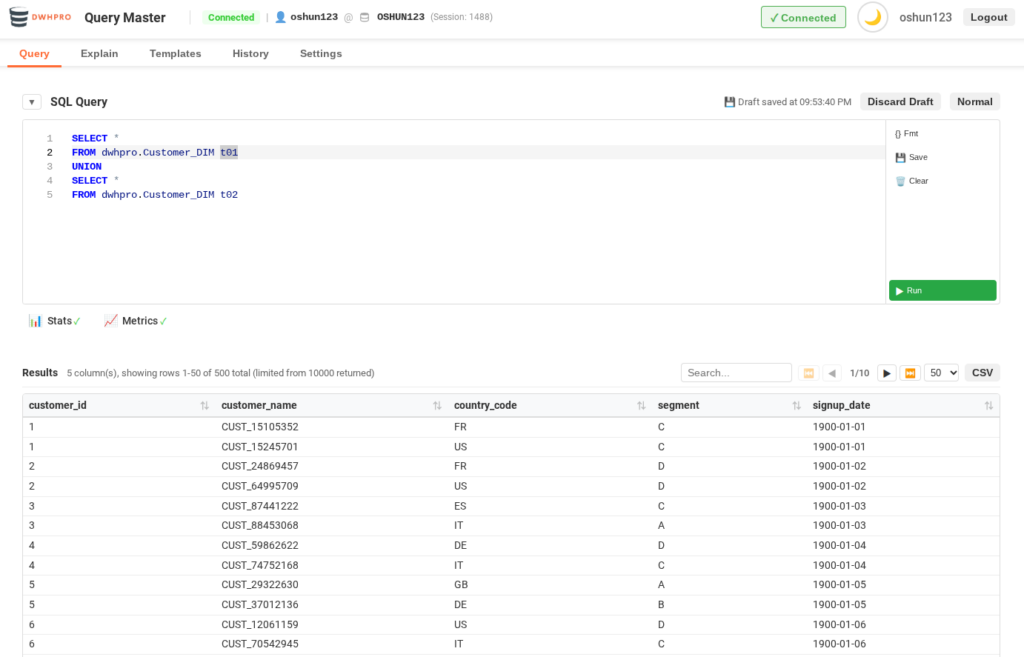
We’ve integrated the same editor that powers VS Code. This gives you proper SQL syntax highlighting, intelligent auto-indentation, and a familiar editing experience. The one-click SQL formatter automatically capitalizes keywords, formats SELECT lists, and properly indents your queries according to best practices.
3. Auto-Save That Actually Works
How many times have you lost a complex query because your application crashed or you accidentally closed a tab? Query Master automatically saves your work every 30 seconds to local storage. When you return, your draft is waiting for you – with a timestamp showing when it was last saved. You can restore it with one click or discard it if you’ve moved on.
4. Built-In Statistics Recommendations
This is one of our most unique features. After executing a query, Query Master automatically analyzes the tables involved and shows you:
– Current statistics status for each table (Current, Stale, Outdated, or Missing)
– Stats recommendations directly from the Teradata optimizer
– Confidence levels (High, Medium, Low) for each recommendation
– One-click collection – Execute recommended COLLECT STATISTICS with a single button
No more switching to a separate window or writing manual COLLECT STATISTICS statements. Query Master even generates a complete script if you prefer to review before executing.
5. Visual Execution Plan Analysis
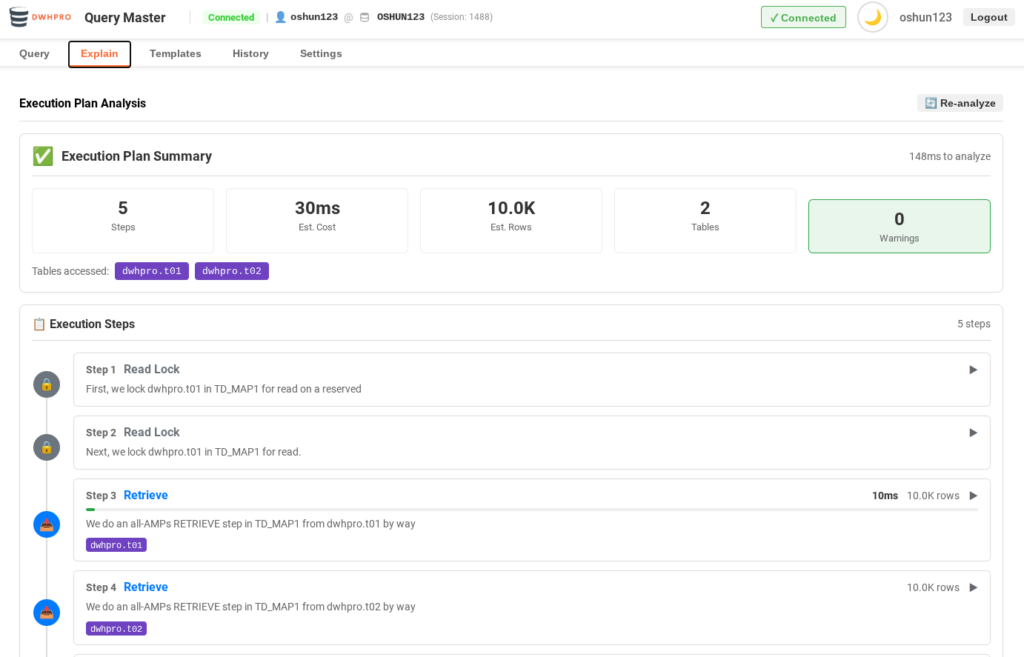
Understanding EXPLAIN output can be challenging, especially for complex queries. Query Master parses Teradata’s execution plan and presents it visually:
– Step-by-step breakdown of operations
– Color-coded indicators for different operation types
– Warning highlights for potential performance issues
– Estimated row counts and cost metrics
Simply switch to the Explain tab, and Query Master automatically analyzes your current query.
6. Performance Metrics in Query History
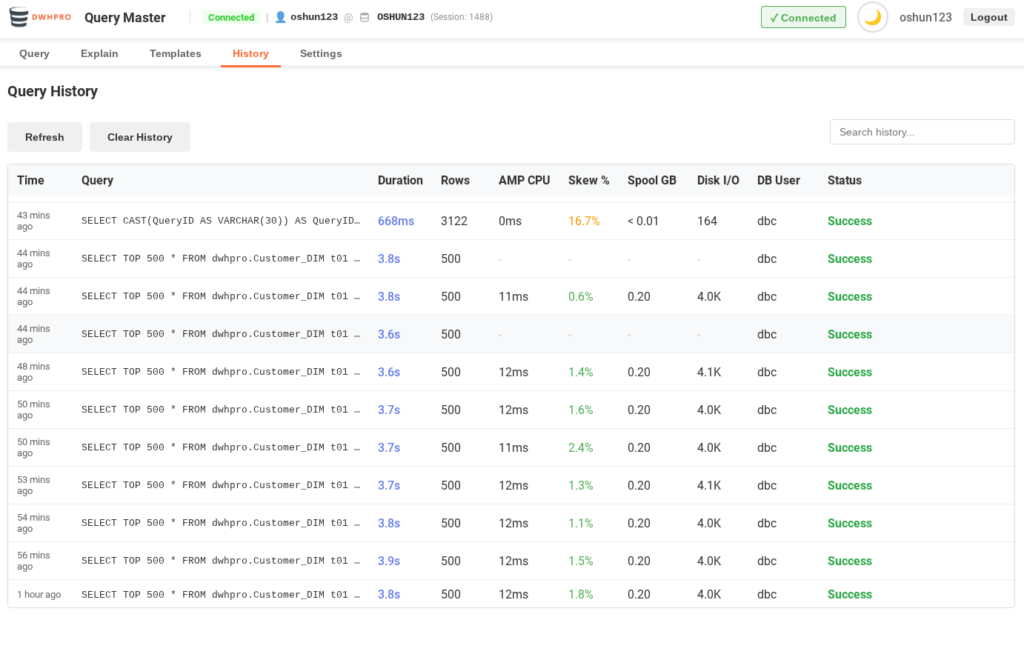
Every query you execute is logged with comprehensive performance metrics pulled directly from DBC.QryLog:
– AMP CPU Time – Total CPU consumption across AMPs
– Skew Percentage – Color-coded indicator (green < 10%, orange 10-30%, red > 30%)
– Spool Usage – Displayed in human-readable GB format
– Disk I/O Count – Formatted with K/M/B suffixes for readability
These metrics help you identify problematic queries at a glance and track performance trends over time.
7. Connection Profiles with Encryption
Managing multiple Teradata environments? Query Master supports saved connection profiles with AES-256-GCM encrypted credentials. Set a default profile for automatic connection on login, or switch between Production, Development, and Test environments with a single click.
8. Real-Time Query Control
Watch your query execute with a live timer, and cancel it instantly if needed. Unlike some tools where “cancel” just stops the client while the query continues running on the server, Query Master actually aborts the Teradata session – freeing up resources immediately.
9. Smart Results Management
Working with large result sets is effortless:
– Sortable columns with intelligent type detection (numbers sort numerically)
– Real-time search across all columns
– Configurable pagination (50, 100, 200, or 500 rows per page)
– One-click CSV export with RFC 4180 compliance
– Configurable row limits to prevent overwhelming your browser
10. Dark Mode for Late-Night Debugging
Because sometimes you’re troubleshooting at 2 AM, and bright white screens aren’t helpful. Toggle between light and dark themes with a single click – your preference is remembered across sessions.
– Multi-user support with individual accounts and complete data isolation
– Session-based authentication with bcrypt password hashing
– Rate limiting to prevent abuse
– PostgreSQL backend for query history and template storage
– Comprehensive logging for audit trails
Your query history, templates, and connection profiles are private to your account. Multiple team members can use the same deployment without seeing each other’s data.
Who Is This For?
Query Master is ideal for:
– DBAs who need quick access for troubleshooting and monitoring
– Data Analysts running ad-hoc queries and reports
– Developers testing and optimizing SQL during development
– Teams who want a shared, browser-based query interface
– Anyone frustrated with heavy, slow desktop tools
Getting Started
Query Master is designed for easy deployment within your organization. It runs on Node.js and requires only a PostgreSQL database for storing user data and query history. The application connects to your existing Teradata systems – no changes to your database infrastructure required.
Coming soon
If you’re tired of waiting for Teradata Studio to launch, or you want modern features like auto-save, statistics integration, and performance metrics tracking, Query Master is worth evaluating. It’s designed by Teradata professionals, for Teradata professionals.
Interested in learning more or you want to ask me to integrate other features? Contact me at [email protected]
*Query Master is developed by DWHPRO, specialists in Teradata optimization and data warehouse performance.*
Related Services
🔧 Need Expert Database Administration?
Our team brings 25+ years of enterprise DBA experience across Teradata, Snowflake, and Oracle.
Meet Our Team →📋 Considering a Move From Teradata?
Get a personalized migration roadmap in 2 minutes. We have migrated billions of rows from Teradata to Snowflake, Databricks, and more.
Free Migration Assessment →
sorry to say this, are there any client still left with Teradata these days? everyone making so much mumbo jumbo about spark, json, parquet what not.