
Teradata gives you more than one way to store the same data in less space, and they behave very differently once queries start reading it back. This guide brings together the compression material on this site: what multi-value and block level compression each do, how to find the columns worth compressing, and the trade-off you accept in CPU.
Multi-Value and Block Level Compression Compared
Introduction to Teradata Compression
Note: Teradata Block Level Compression is now permanently enabled and cannot be turned off. Nonetheless, this article remains useful for current Teradata systems utilizing block-level compression. It demonstrates the continued advantages of multi-value compression (Teradata MVC).
With Teradata’s introduction of block-level compression, the utilization of multi-value compression at various Teradata sites has decreased. At first glance, disregarding the use of MVC appears logical. However, identifying the most appropriate prospects for MVC involves considerable effort, which is frequently not reasonable in the current era where the storage cost is decreasing, but consultation is costly.
From the start, I want to clarify one thing: MVC and BLC serve distinct application purposes.
MVC aims to enhance the performance of queries by compressing data into blocks for processing. Additionally, it naturally reduces disk space requirements.
BLC does not aid in performance tuning. Teradata must immediately decompress data blocks upon transfer to main memory to enable processing. Therefore, BLC only conserves space and is best utilized for infrequently accessed data, assuming it can be deactivated on your particular system.
Interaction of BLC and MVC
We have four options: not using compression (unavailable on modern Teradata systems as BLC is always enabled), using only MVC (which also applies), using only BLC, or using both. We created a test environment below to measure the impact on resource consumption (such as CPU seconds for packing and unpacking and disk IOs) and space consumption.
In MVC, the columns and compression were carefully selected to ensure that nearly everything is compressed.
Our test setup comprises four tables, as depicted below.
SET QUERY_BAND = 'BLOCKCOMPRESSION=NO;' FOR SESSION;
CREATE SET TABLE DWHPRO.Customer_MVC
(
 CustomerId BIGINT NOT NULL,
 CategoryCd CHAR(100) COMPRESS ('PLATIN','GOLDEN','SILVER','BRONZE‘)
)
PRIMARY INDEX ( CustomerId );
SET QUERY_BAND = 'BLOCKCOMPRESSION=NO;' FOR SESSION;
CREATE SET TABLE DWHPRO.Customer_NONE
(
CustomerId BIGINT NOT NULL,
CategoryCd CHAR(100)
)
PRIMARY INDEX ( CustomerId );SET QUERY_BAND = 'BLOCKCOMPRESSION=YES;' FOR SESSION;
CREATE SET TABLE DWHPRO.Customer_BLC_MVC
(
CustomerId BIGINT NOT NULL,
CategoryCd CHAR(100) COMPRESS ('PLATIN','GOLDEN','SILVER','BRONZE‘)
)
PRIMARY INDEX ( CustomerId );SET QUERY_BAND = 'BLOCKCOMPRESSION=YES;' FOR SESSION;
CREATE SET TABLE DWHPRO.Customer_BLC
(
CustomerId BIGINT NOT NULL,
CategoryCd CHAR(100)
)
PRIMARY INDEX ( CustomerId );To be concise, we added 10 million rows to each table for greater significance. The CategoryCd column only includes four values: ‘PLATINUM’, ‘GOLD’, ‘SILVER’, and ‘BRONZE’.
Comparing the Disk IOs
The disk input/output operations result from performing a complete table scan without using indexes.
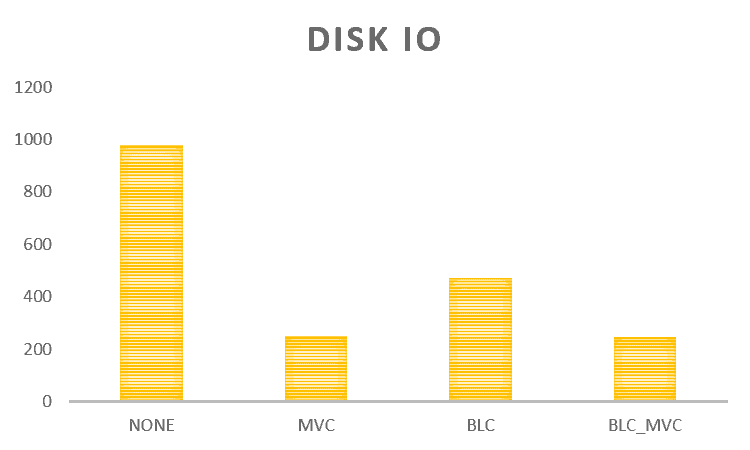
By solely analyzing the disk IOs, we can deduce the following from the outcome:
- Not using compression is always wrong.
- We should combine block-level compression with MVC
Our test optimized the MVC setup to allow for the compression of nearly everything. However, in actual environments, such optimization may not be feasible.
Comparing the CPU Seconds
We will now investigate how varying compression techniques impact CPU consumption.
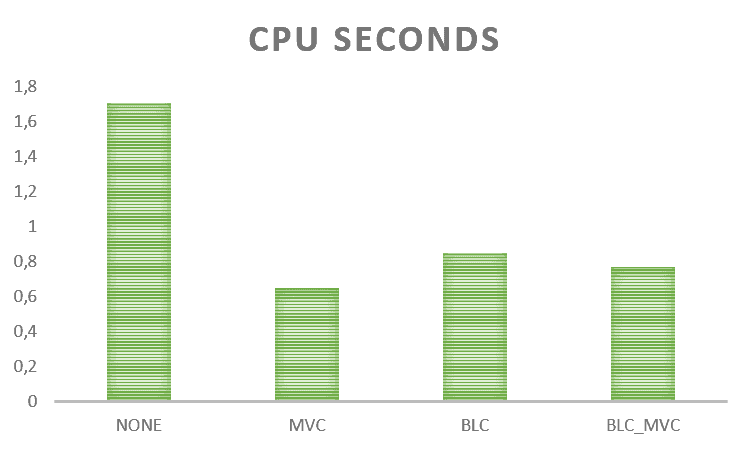
Here is the emerging picture:
- Not using compression is always wrong.
- Block-level compression increases the CPU seconds needed and should only be used for cold data.
Comparing the Space Usage
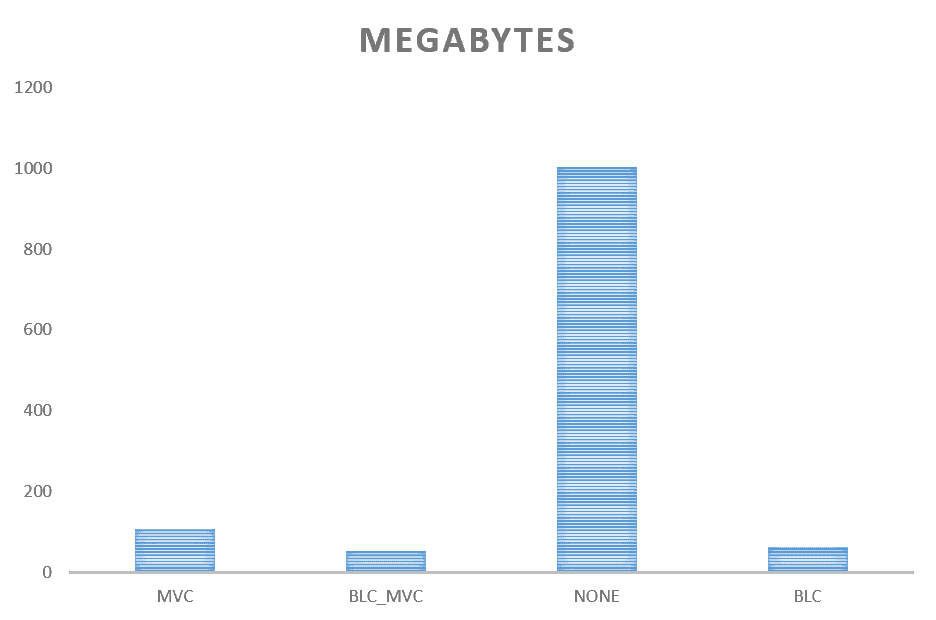
If we focus solely on permanent space savings, the following image arises:
- Not using compression is always wrong.
- MVC and BLC together have about the same space savings as BLC alone.
- Even the highly optimized MVC setup we chose does not achieve space savings on its own as BLC alone or a combination of both.
Summary
Although the results may appear straightforward, it’s important to approach them with caution. Our scenario was designed to optimize MVC, which may not always be feasible in real-world situations. The benefits of implementing additional MVC are also limited if BLC is already enabled on most systems.
Additionally, there are few automated tools available for MVC, and the cost of hiring a consultant is no longer proportional to the price of mass storage. The days of Teradata consultants spending weeks on MVC to save costly disk space seem behind us.
It looks different here if you examine the whole thing from the CPU side. If we deal with a CPU-bound system, MVC can make sense to bring load off the machine.
Enabling BLC results in only a minor discrepancy in disk IOs, so there is no justification for using MVC.
I conclude that MVC should only be implemented if there is a high CPU usage issue. Therefore, we should prioritize our time on more productive tasks rather than searching for potential MVC candidates.
Finding Candidate Columns for MVC
Analyzing a large Teradata table with Multivalue compression incurs high workload costs.
Unfortunately, Teradata does not provide any mechanism to automate this undertaking.
Analysis typically involves tallying unique values in each table column, a time-consuming and resource-intensive process for large tables.
Fortunately, Teradata 14.10 offers a more cost-effective solution.
SHOW STATISTICS VALUES COLUMN <column> ON <table>;
This statement displays biased column values and other useful statistics. Biased values are often ideal for Teradata Multivalue compression.
This approach’s main benefit is the absence of a costly table analysis, which contrasts with the method of counting distinct column values for each column of a large table. Despite this, it still provides exceptional compression recommendations.
Considering the count of NULL values in each column is an effective starting point to reduce space usage swiftly.
While effective in producing swift outcomes, this approach is not without its downsides:
- It only works for columns with collected and correct statistics.
- Unfortunately, the information used in the SHOW STATISTICS statement is taken from a binary object (“FieldStatistics”). There is no easy way to extract this information. As a substitute, we have to use the text output of the statement and parse it, to be able to automate the process of creating compression statements.
Saving Space with Block Level Compression
The latest generation of Teradata systems always has Block Level Compression (BLC) enabled. When using MultiValue compression, the compression factor is typically low.
How Block Level compression and MultiValue compression relate to each other is shown in detail in the article below:
In this article, we will show you a trick on how to use Block Level compression together with Teradata Row Level Partitioning to save space.
To comprehend this, it is crucial to grasp the functioning of Block Level Compression and Row Partitioning.
BLC packs whole data blocks using different algorithms. These include ZLIB (software compression) and ELZS_H (hardware compression), used in 9 different compression levels.
BLC is not utilized for performance tuning due to the need to decompress data blocks in memory upon access. However, this article’s focus is on space conservation.
BLC achieves better compression when equal values are grouped together in a data block. Consider a table with a date field and a unique primary index (UPI).
Due to the primary index distribution, date values will be distributed randomly across the AMPs without row partitioning. A UPI will distribute evenly across all AMPs.
Let’s discuss how data in a Row Partitioned Table is distributed. Initially, the data is distributed to the AMPs based on the UPI. Following that, the rows are sorted into the designated partitions according to the partition expression.
For our example, we can base the partition expression on the date. The aim of Row Partitioning is to store rows with identical dates in the same partition. This ensures they are physically adjacent on the disk, enabling efficient access.
This means that better compression and space savings can be achieved simultaneously. The compression algorithms achieve higher compression rates because the date values are stored close together within the same data blocks.
In practice, ideal conditions can result in up to 50% smaller tables.
It is important to consider the overall design when utilizing row partitioning. While it may be appropriate for temporary tables, it should not be used solely for space-saving purposes on production tables.
In the future, should you encounter insufficient space again, it would be worthwhile to contemplate this alternative.
Compression only pays off relative to what the row costs uncompressed: how the data type decides the stored width.
What compression is competing against, and where else it shows up: the pattern that shrank an already-compressed table to a tenth, run-length, dictionary and delta compression in Teradata Columnar and how columnar storage behaves in the cloud.
Related storage reading: block-level compression and what it saves, multi-value compression in practice and how the data type sets the uncompressed width.
Related Services
⚡ Need Help Optimizing Your Data Platform?
We cut data platform costs by 30–60% without hardware changes. 25+ years of hands-on tuning experience.
Explore Our Services →📋 Considering a Move From Teradata?
Get a personalized migration roadmap in 2 minutes. We have migrated billions of rows from Teradata to Snowflake, Databricks, and more.
Free Migration Assessment →