
This article illustrates loading a flat file into an empty Teradata table using TPT. The example was successfully tested on Teradata 16.20.
Although TPT does offer a wide range of advanced options for loading files, it can be overwhelming for basic tasks. In this demonstration, I will present a simplified approach to loading flat files with any number of columns and a selectable separator into a Teradata target table.
We assume that the target table is present and empty.
CREATE TABLE DWHPRO.FlatFile
(
	ColA CHAR(10),
	ColB CHAR(10)
) PRIMARY INDEX (ColA);
Here is a TPT script example. Define the TargetTable parameter, which corresponds to the $INSERT template. The parameter file provides details about the flat file to the $FILE_READER template. Additionally, the parameter file includes the logon definition.
/* Parameter file dwhprovars.txt */
/********************************************************/
/* TPT LOAD Operator setting                            */
/********************************************************/
 LoadTdpId                  = '127.0.0.1'
,LoadUserName               = 'tuning'
,LoadUserPassword           = '********'
,LoadPrivateLogName         = 'LOAD_OPERATOR_LOG'
,LoadTraceLevel             = 'None'

/********************************************************/
/* TPT DataConnector Producer Operator setting          */
/********************************************************/
,FileReaderFileName         = 'dwhpro.txt'
,FileReaderFormat           = 'Delimited'
,FileReaderOpenmode         = 'Read'
,FileReaderDirectoryPath    = './'
,FileReaderTextDelimiter    = ';'
,FileReaderPrivateLogName   = 'FILE_READER_LOG'
/* Script SimpleFlatFile */
DEFINE JOB FlatFile
DESCRIPTION 'Load a flat file'
(

  SET TargetTable = 'FlatFile';
  SET LogTable = @TargetTable || '_LOG';

  STEP MAIN_STEP
  (
    APPLY $INSERT TO OPERATOR ( $LOAD [1] )
    SELECT * FROM OPERATOR ( $FILE_READER [1] );
  );
);
Using Fastload, we can load any flat file that has a separator. The FileReaderTextDelimiter can define the separator. In our case, we use “;” instead of the default pipe character that TPT expects. The file we use as an example is shown below.
a;b
c;d
e;f
tbuild -f SimpleFlatFile -v dwhprovars.txt -j dwhpro
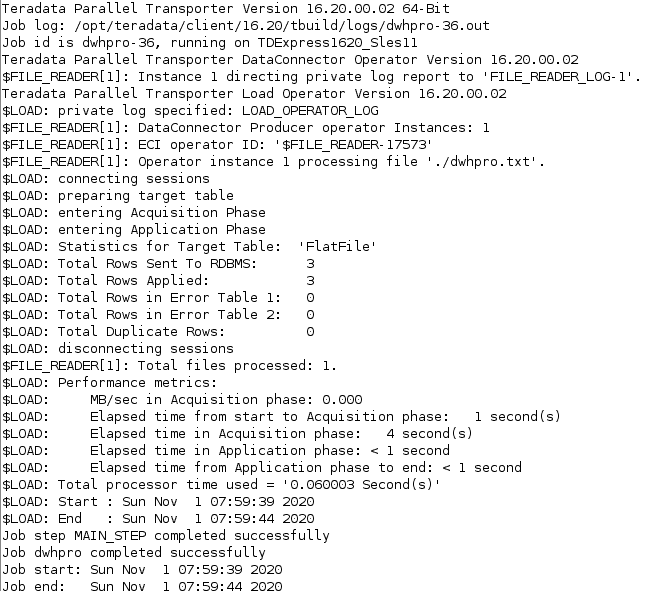
TPT templates simplify scripting by eliminating the need for complex scripts. TPT automatically switches from Fastload to Multiload if the target table is not empty, but this feature is not available in our example with templates. As a result, users must delete all rows beforehand.
What are TPT Templates?
TPT templates are the textual definition of operators and can be included easily, as shown above. For example, $FILE_READER defines a DATACONNECTOR PRODUCER operator. The templates can be found in the following path in the Linux file system:
/opt/teradata/client/16.20/tbuild/template
Related Services
🔧 Need Expert Database Administration?
Our team brings 25+ years of enterprise DBA experience across Teradata, Snowflake, and Oracle.
Meet Our Team →📋 Considering a Move From Teradata?
Get a personalized migration roadmap in 2 minutes. We have migrated billions of rows from Teradata to Snowflake, Databricks, and more.
Free Migration Assessment →