
I was recently approached to support a case of importing the results of a Teradata query into a third-party vendor database. On the export side, Teradata happily wrote close to 60 million rows into a single, wide CSV file. On the other side, the import process to the target database could not cope with the number of lines in the CSV file and was crashing.
Environment setup
To make things worse, we were trapped inside a Microsoft Windows user environment with no access to UNIX-like tools or permission to download or install any piece of additional software. Teradata was accessible via Teradata SQL Assistant, so the only option was to split the query results into multiple CSV files, each having 10-15 million lines. At this number, the import process would then ingest the files.
First attempt: Manual export
Pagination requires a unique, stable ORDER BY and the same source snapshot for all batches. A changing source or nonunique ordering can cause gaps or duplicates. The expression below is a template; substitute columns that form a unique order.
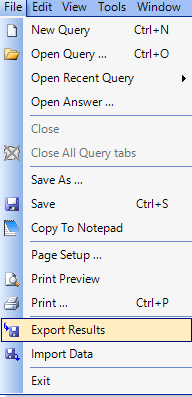
QUALIFY ROW_NUMBER() OVER (ORDER BY unique_PI_columns) BETWEEN 1 AND 10000000In theory, this would work: Activate “Export Results”, run once, save under a different filename, change expression, and repeat 5-6 times. In practice, it performed badly. Teradata had to sort each time 60 million wide rows over a view and then filter the numbered records. A batch of 10 million rows took almost one hour to extract and nobody was willing to babysit this for almost the whole working day.

Get the complete Teradata tuning book, free
Teradata Query Performance Tuning: The DWHPro Guide
By Roland Wenzlofsky & Artemios Vogiatzis
206 pages on statistics and demographics, access paths and indexes, query execution plans, and joins. Get the full PDF and practical Teradata updates from DWHPro.
Confirm your email to receive your download link. Privacy policy. Unsubscribe in any newsletter.
About the free bookSecond attempt: Split files automatically
The next attempt was to find a way to automate the file split. A quick Internet search suggests that this is not possible without third-party tools. However, there is a way to use only the Teradata SQL Assistant!
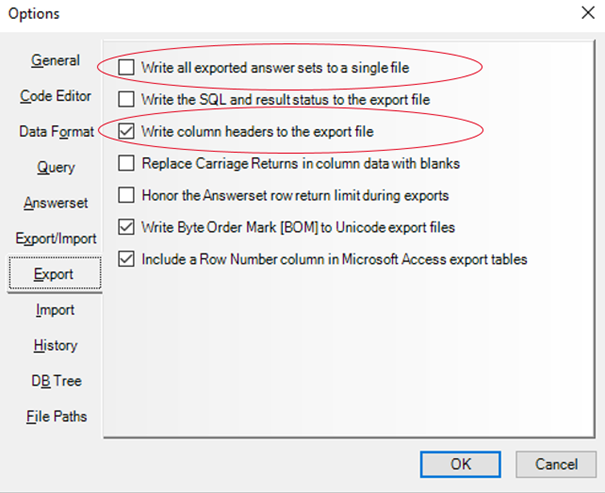
The key observation is that Teradata SQL Assistant treats each part of a multi-statement as a separate answer set. The trick is to disable in Teradata SQL Assistant the option to “Write all exported answer sets to a single file“, as shown in the screenshot below, and combine it with “Write column headers to the export file“.
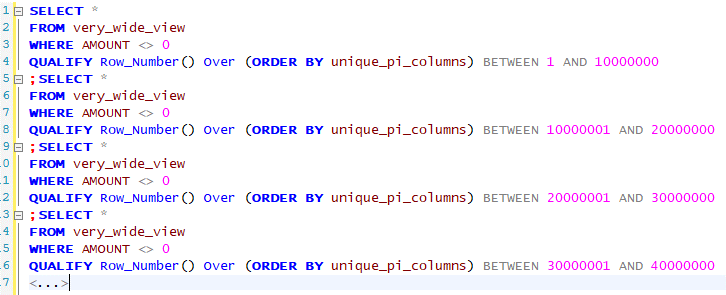
We refactored the query as a multi-statement, as shown in the screenshot below. Teradata happily executed each statement and saved the output in a separate CSV file, including a CSV header. This was exactly the format needed for the import process. The export process was automated. Still, it was slow, taking too much time and resources to sort all these 60 million rows. Could we improve this further?
Third attempt: Faster bucketing
Globally sorting the rows and creating disjoint sets ensures that the same row is not written to more than one file. There is an alternative to achieve the same outcome: Leverage on Teradata HASHBUCKET function and writing rows using modulo arithmetic.
In our case, the base table definition happened to include a Unique Primary Index (UPI). Then, a HASHROW calculation over the UPI columns is an extremely fast operation; calculating a HASHBUCKET and a modulo on top of it adds negligible overhead. We quickly confirmed that a uniform distribution could be achieved with MOD 5 and that 12-13 million rows could still be handled by the import process. The final query reads like this:
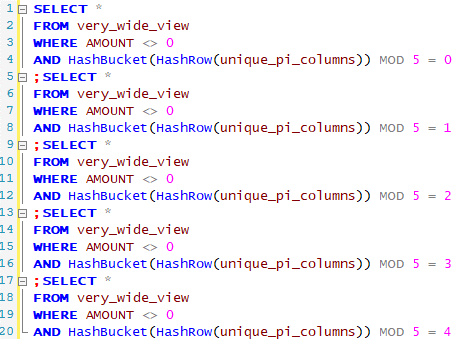
The original case reportedly exported five files in under ten minutes; that throughput and SQL Assistant file output were not retested. Predicate fixtures verified group membership and a ten-row ROW_NUMBER range, not client settings or export speed.

Final thoughts
Access to proper tools is many times assumed but sometimes not given. Initially, the problem was stated as splitting a file into parts every N lines of output. Such an approach is not supported out-of-the-box by Teradata (neither SQL Assistant nor TPT tools). Still, there is a way to make it happen by leveraging multi-statements.
Hash modulo assigns each eligible row to one group but does not guarantee equal group sizes or a maximum file size. In the audit, 68 eligible rows split into groups of 15, 11, 17, 11 and 14. Physical CSV lines are not record counts when fields contain embedded newlines; validate using CSV parsing.
Teradata hash-related functions and modulo arithmetic are a natural choice for this, and they are very fast to calculate. The question then becomes what to use as input to achieve a smooth distribution. In our case, we could leverage hashing the unique primary index columns. In other cases, some more experimentation may be needed!
I would love to read in the comments below your thoughts on the approach. Do you know or would you suggest a different one?
Before applying the multi-file approach, check your connection and export settings in the SQL Assistant setup and CSV export guide. Validate a small file first, including delimiters, headers and date values.
Building or improving a data pipeline?
Discuss ingestion, transformations, orchestration, quality checks and operational handover.
Get the complete Teradata tuning book, free
Teradata Query Performance Tuning: The DWHPro Guide
By Roland Wenzlofsky & Artemios Vogiatzis
206 pages on statistics and demographics, access paths and indexes, query execution plans, and joins. Get the full PDF and practical Teradata updates from DWHPro.
Confirm your email to receive your download link. Privacy policy. Unsubscribe in any newsletter.
About the free book
you are right in saying..Access to proper tools is many times assumed but sometimes not given..thanks for sharing your exp. great lesson.
Thank you for the nice words!