
How Do I Select The Appropriate Data Type In Teradata?
Converting data types incurs substantial costs and demands significant CPU resources when dealing with extensive tables.
Part of the Teradata Physical Design and Data Modelling guide.
Incorrect data type selection hinders the execution plan.
This article will discuss selecting appropriate data types for optimal performance.
Consistency in selecting data types across different tables is crucial, as Teradata relies on its hashing algorithm to distribute and locate data.
Different types can hash differently, but some are hash-compatible; evaluate the actual expressions and comparison semantics.
Varying hash values may hinder certain operations, such as AMP local joins or accessing via Primary Index or USI, necessitating a complete table scan.
Consider the literals 3 (numeric) and ‘3’ (character) as illustrations and examine their associated hash values.
SELECT HASHROW(3);SELECT HASHROW('3');Different hashes can still map to the same AMP because buckets/maps are many-to-one. Do not infer distinct AMP placement from unequal row hashes.
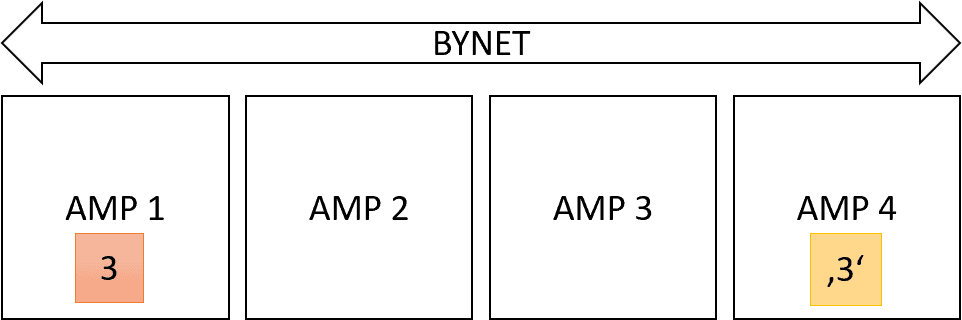
A join may redistribute or duplicate inputs when they are not already colocated. Whether movement is needed depends on the complete join expressions, access paths and table maps.
Hash-Compatible Data Types
Different data types generate the same hash value only if they are compatible.
All integer data types generate identical hash values, including INTEGER, BIGINT, BYTEINT, SMALLINT, and DECIMAL without decimal places. Additionally, Teradata stores dates as integers, making them compatible with other integer data types.
NULL, zero and empty-string hashes matched in the tested expressions. Character hashing and comparisons require attention to character set, case and collation; do not infer universal behavior from a single literal example.

Get the complete Teradata tuning book, free
Teradata Query Performance Tuning: The DWHPro Guide
By Roland Wenzlofsky & Artemios Vogiatzis
206 pages on statistics and demographics, access paths and indexes, query execution plans, and joins. Get the full PDF and practical Teradata updates from DWHPro.
Confirm your email to receive your download link. Privacy policy. Unsubscribe in any newsletter.
About the free bookCHAR and VARCHAR data types are hash-compatible.
Spaces can impact the hash value. Consider these three queries:
SELECT HASHROW (' a');
95-26-AC-0D
SELECT HASHROW ('a');
CE-EA-E2-15
SELECT HASHROW ('a ');
CE-EA-E2-15
The string with a leading space produces a different hash value compared to strings with no spaces or a trailing space.
The Impact Of A Poor Data Model
Here is another example of the impact caused by a mismatch in data types resulting from an incorrect data model.
We generate three tables and populate the primary key column with random numbers.
CREATE TABLE INT_PI
(
    PK INTEGER
) PRIMARY INDEX (PK);
 CREATE TABLE INT2_PI
(
    PK INTEGER
) PRIMARY INDEX (PK);
 CREATE TABLE CHAR_PI
(
    PK CHAR(20)
) PRIMARY INDEX (PK);
INSERT INTO INT_PI SELECT ROW_NUMBER() OVER (ORDER BY 1 ) FROM SYS_CALENDAR.CALENDAR;
INSERT INTO INT2_PI SELECT ROW_NUMBER() OVER (ORDER BY 1 ) FROM SYS_CALENDAR.CALENDAR;
INSERT INTO CHAR_PI SELECT ROW_NUMBER() OVER (ORDER BY 1 ) FROM SYS_CALENDAR.CALENDAR;We query the two tables using the “PK” column, which is defined as an integer.
SELECT * FROM INT_PI WHERE PK IN (SELECT PK FROM INT2_PI);The optimizer produces the following execution plan.
Explain SELECT * FROM INT_PI WHERE PK IN (SELECT PK FROM INT2_PI);

  4) We do an all-AMPs JOIN step in TD_MAP1 from DWHPRO.INT_PI by way
     of an all-rows scan with no residual conditions, which is joined
     to DWHPRO.INT2_PI by way of an all-rows scan with no residual
     conditions.  DWHPRO.INT_PI and DWHPRO.INT2_PI are joined using an
     inclusion merge join, with a join condition of ("DWHPRO.INT_PI.PK
     = DWHPRO.INT2_PI.PK").  The result goes into Spool 1 (group_amps),
     which is built locally on the AMPs.  The size of Spool 1 is
     estimated with low confidence to be 73,408 rows (1,835,200 bytes).
     The estimated time for this step is 0.27 seconds.
  5) Finally, we send out an END TRANSACTION step to all AMPs involved
     in processing the request.
  -> The contents of Spool 1 are sent back to the user as the result of
     statement 1.  The total estimated time is 0.27 seconds.
The execution plan reveals a direct (AMP local) join executed without transferring rows between AMPs. Such an outcome is made feasible by the identical primary index and data type.
Now let’s examine the query where one of the tables has designated the “PK” column as a character.
SELECT * FROM INT_PI WHERE PK IN (SELECT PK FROM CHAR_PI);The corresponding execution plan is shown below:
  4) We execute the following steps in parallel.
       1) We do an all-AMPs RETRIEVE step in TD_MAP1 from DWHPRO.INT_PI
          by way of an all-rows scan with no residual conditions into
          Spool 3 (all_amps) fanned out into 8 hash join partitions,
          which is duplicated on all AMPs in TD_Map1.  The size of
          Spool 3 is estimated with low confidence to be 146,816 rows (
          2,642,688 bytes).  The estimated time for this step is 0.12
          seconds.
       2) We do an all-AMPs RETRIEVE step in TD_MAP1 from
          DWHPRO.CHAR_PI by way of an all-rows scan with no residual
          conditions into Spool 5 (all_amps), which is redistributed by
          the hash code of (DWHPRO.CHAR_PI.PK (FLOAT, FORMAT
          '-9.99999999999999E-999')) to all AMPs in TD_Map1.  Then we
          do a SORT to order Spool 5 by the sort key in spool field1
          eliminating duplicate rows.  The size of Spool 5 is estimated
          with low confidence to be 73,504 rows (2,131,616 bytes).  The
          estimated time for this step is 0.22 seconds.
  5) We do an all-AMPs RETRIEVE step in TD_Map1 from Spool 5 (Last Use)
     by way of an all-rows scan into Spool 4 (all_amps) fanned out into
     8 hash join partitions, which is redistributed by the hash code of
     (PK (FLOAT, FORMAT '-9.99999999999999E-999')(FLOAT)) to all AMPs
     in TD_Map1.  The size of Spool 4 is estimated with low confidence
     to be 73,504 rows (2,205,120 bytes).
  6) We do an all-AMPs JOIN step in TD_Map1 from Spool 3 (Last Use) by
     way of an all-rows scan, which is joined to Spool 4 (Last Use) by
     way of an all-rows scan.  Spool 3 and Spool 4 are joined using a
     inclusion hash join of 8 partitions, with a join condition of (
     "(PK )= Field_2").  The result goes into Spool 1 (group_amps),
     which is built locally on the AMPs.  The size of Spool 1 is
     estimated with low confidence to be 73,408 rows (1,835,200 bytes).
     The estimated time for this step is 0.35 seconds.
  7) Finally, we send out an END TRANSACTION step to all AMPs involved
     in processing the request.
  -> The contents of Spool 1 are sent back to the user as the result of
     statement 1.
Both tables are utilized in this query through copying or redistribution. Further sorting of the rows and conversion of the data types is required.
These historical plans illustrate possible extra work. The audit returned the same 1,000 matches for numeric and mixed-type fixtures, but did not benchmark a speed difference.
What We Should Learn From It
Inappropriate data types indicate flawed data modeling. Frequently, data is loaded into projects haphazardly, resulting in a disorganized data model.
Opting for quick and inexpensive solutions at the onset of a project may appear appealing, but ultimately results in significantly elevated expenses upon completion.
Need help with query performance or platform costs?
Diagnose plans, skew, spool pressure and expensive workloads. Agree a baseline and acceptance criteria before making changes.
Get the complete Teradata tuning book, free
Teradata Query Performance Tuning: The DWHPro Guide
By Roland Wenzlofsky & Artemios Vogiatzis
206 pages on statistics and demographics, access paths and indexes, query execution plans, and joins. Get the full PDF and practical Teradata updates from DWHPro.
Confirm your email to receive your download link. Privacy policy. Unsubscribe in any newsletter.
About the free book
Hi Roland,
Just to pick up on a question that you asked above. Yes, any DECIMAL data type with 0 digits after the decimal point will always generate the same hash as the same value in one of the integer data types.
It is for the reason that you thought, in Teradata DECIMAL columns are stored as ‘scaled integers’. So, a value of 12.3 stored in a DECIMAL(10,2) is stored as 1230. Similarly, the same value stored in a DECIMAL(10,1) would be stored as 123. This is why decimals with 0 decimal places will hash the same as integers.
Cheers,
Dave