
The initial situation without any index
In this blog, I will demonstrate how to optimize a query using Teradata’s tools.
We will begin with the following test scenario:
CREATE TABLE Orders
(
	OrderId  BIGINT NOT NULL,
	CustomerId	BIGINT NOT NULL,
	Amount		BIGINT
) PRIMARY INDEX (OrderId);
INSERT INTO Orders
SELECT
ROW_NUMBER() OVER (ORDER BY 1),
RANDOM(1,10000) AS CustomerId,
RANDOM(1,100)
FROM SYS_CALENDAR.CALENDAR; The data is evenly distributed. To demonstrate the query’s selectivity for the tested indexes we will define later, I assigned a significant portion of rows the same Primary Index value that will be used for the index.
UPDATE ORDERS SET CustomerId = 9999 WHERE CustomerId > 5000;SELECT CustomerId,COUNT(*) FROM ORDERS GROUP BY 1
ORDER BY 2 DESC;| CustomerId | Count(*) |
| 9999 | 7383 |
| 7834 | 30 |
| 5003 | 18 |
| … | … |
We now gather statistics on all columns to enable the optimizer to produce optimal estimates.
COLLECT STATS ON ORDERS COLUMN(OrderId);
COLLECT STATS ON ORDERS COLUMN(CustomerId);
COLLECT STATS ON ORDERS COLUMN(Amount);
Without Index Usage
We will first run this query without an index to establish a baseline.
SELECT * FROM Orders WHERE CustomerId = 3000;This is the Execution Plan:
Explain
SELECT * FROM Orders WHERE CustomerId = 3000;

  1) First, we lock DWHPRO.Orders in TD_MAP1 for read on a reserved
     RowHash to prevent global deadlock.
  2) Next, we lock DWHPRO.Orders in TD_MAP1 for read.
  3) We do an all-AMPs RETRIEVE step in TD_MAP1 from DWHPRO.Orders by
     way of an all-rows scan with a condition of (
     "DWHPRO.Orders.CustomerId = 3000") into Spool 1 (group_amps),
     which is built locally on the AMPs.  The size of Spool 1 is
     estimated with high confidence to be 8 rows (360 bytes).  The
     estimated time for this step is 0.02 seconds.
  4) Finally, we send out an END TRANSACTION step to all AMPs involved
     in processing the request.
  -> The contents of Spool 1 are sent back to the user as the result of
     statement 1.  The total estimated time is 0.02 seconds.
The optimizer has no choice but to make a full table scan because the WHERE condition does not correspond to the table’s primary index.

Get the complete Teradata tuning book, free
Teradata Query Performance Tuning: The DWHPro Guide
By Roland Wenzlofsky & Artemios Vogiatzis
206 pages on statistics and demographics, access paths and indexes, query execution plans, and joins. Get the full PDF and practical Teradata updates from DWHPro.
Confirm your email to receive your download link. Privacy policy. Unsubscribe in any newsletter.
About the free bookTeradata NUSI Usage
Given the high selectivity of the query, implementing a NUSI is appropriate. Consequently, we will generate a NUSI corresponding to the column specified in the WHERE condition.
CREATE INDEX (CustomerId) ON Orders;We rerun our query.
SELECT * FROM Orders WHERE CustomerId = 3000;Explain SELECT * FROM Orders WHERE CustomerId = 3000;
1) First, we lock DWHPRO.Orders in TD_MAP1 for read on a reserved
RowHash to prevent global deadlock.
2) Next, we lock DWHPRO.Orders in TD_MAP1 for read.
3) We do an all-AMPs RETRIEVE step in TD_MAP1 from DWHPRO.Orders by
way of index # 4 "DWHPRO.Orders.CustomerId = 3000" with no
residual conditions into Spool 1 (group_amps), which is built
locally on the AMPs. The size of Spool 1 is estimated with high
confidence to be 8 rows (360 bytes). The estimated time for this
step is 0.01 seconds.
4) Finally, we send out an END TRANSACTION step to all AMPs involved
in processing the request.
-> The contents of Spool 1 are sent back to the user as the result of
statement 1. The total estimated time is 0.01 seconds.
Since the NUSI is selective enough, the optimizer uses it. This is already an improvement over the previous scenario without an index. But is there something even better?
The “Hashed NUSI”
Implementation of the NUSI has led to significant enhancements in performance.
Although NUSI has benefits, it also has a drawback; it operates as an ALL-AMP system, with NUSI index rows residing on the same AMP as the base table rows and not distributed by hashing.
Let’s create a hash-distributed NUSI. I will demonstrate how to do this in the following example.
CREATE JOIN INDEX Orders_JI
AS
SELECT CustomerId,ROWID FROM ORDERS PRIMARY INDEX (CustomerId);
COLLECT STATS ON Orders_JI COLUMN(CustomerId);

COLLECT STATS ON Orders_JI COLUMN(CustomerId);
The join-index key lookup can be single-AMP, but the subsequent ROWID join can involve multiple base-row AMPs. Do not describe the entire request as a one-AMP operation.
We re-run our query.
SELECT * FROM Orders WHERE CustomerId = 3000;This is the Execution Plan:
Explain SELECT * FROM Orders WHERE CustomerId = 3000;

  1) First, we lock DWHPRO.Orders in TD_MAP1 for read on a reserved
     RowHash to prevent global deadlock.
  2) Next, we lock DWHPRO.Orders in TD_MAP1 for read.
  3) We do a single-AMP RETRIEVE step from DWHPRO.ORDERS_JI by way of
     the primary index "DWHPRO.ORDERS_JI.CustomerId = 3000" with no
     residual conditions into Spool 2 (all_amps), which is
     redistributed by the hash code of (DWHPRO.ORDERS_JI.Field_1026) to
     few or all AMPs in TD_Map1.  Then we do a SORT to order Spool 2 by
     the sort key in spool field1.  The size of Spool 2 is estimated
     with high confidence to be 8 rows (248 bytes).  The estimated time
     for this step is 0.00 seconds.
  4) We do an all-AMPs JOIN step in TD_Map1 from Spool 2 (Last Use) by
     way of an all-rows scan, which is joined to DWHPRO.Orders by way
     of an all-rows scan with no residual conditions.  Spool 2 and
     DWHPRO.Orders are joined using a row id join, with a join
     condition of ("Field_1 = DWHPRO.Orders.ROWID").  The result goes
     into Spool 1 (group_amps), which is built locally on the AMPs.
     The size of Spool 1 is estimated with low confidence to be 8 rows
     (360 bytes).  The estimated time for this step is 0.01 seconds.
  5) Finally, we send out an END TRANSACTION step to all AMPs involved
     in processing the request.
  -> The contents of Spool 1 are sent back to the user as the result of
     statement 1.  The total estimated time is 0.01 seconds.
The join index does not require uniqueness and can be located through a single AMP.
The Improved “Hashed NUSI”
A final enhancement is available for our Join Index, which maintains the Index Rows, illustrated in the graphic below:
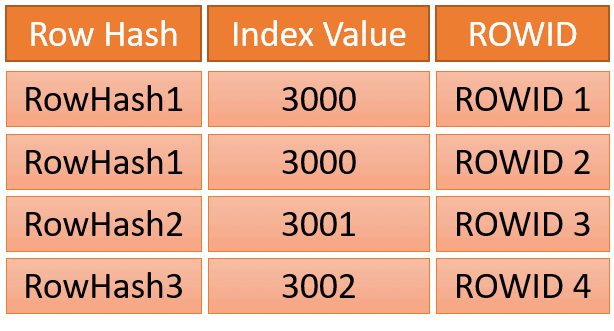
The NUSI stores all ROWIDs associated with a single index value cohesively.
This format is easily achieved with a Join Index, using the following syntax (noting the brackets).
The compressed join index groups different ROWIDs under repeated key values; it does not compress repeated identical ROWIDs.
DROP JOIN INDEX Orders_JI;
CREATE JOIN INDEX Orders_JI
AS
SELECT (CustomerId),(ROWID) FROM ORDERS PRIMARY INDEX (CustomerId);
COLLECT STATS ON Orders_JI COLUMN(CustomerId);

COLLECT STATS ON Orders_JI COLUMN(CustomerId);
The syntax stores identical ROWIDs from NUSI in an index row. If a single index row is insufficient, multiple index rows are used.
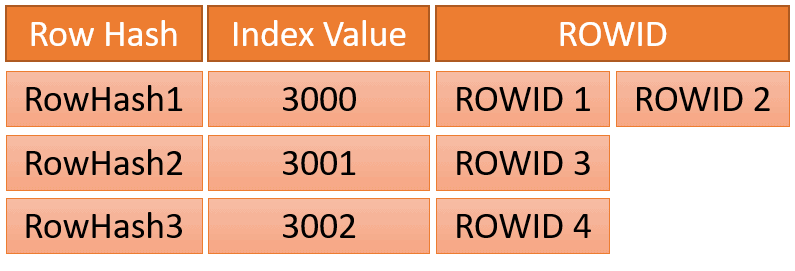
Why is the compression of the Teradata join index so important?
Compressing data not only saves storage space but also reduces the number of required I/Os.
SELECT TABLENAME,SUM(CURRENTPERM) AS Perm
FROM DBC.TABLESIZE
WHERE DATABASENAME = 'DWHPRO'
AND TABLENAME LIKE 'Orders_JI%'
GROUP BY 1;| Tablename | Perm |
| Orders_JI | 1 875 968 |
| Orders_JI_Comp | 1 114 112 |
The condensed index is merely 60% the size of the uncompressed index.
Final Words
This example demonstrates the multitude of query optimization possibilities available with Teradata.
The Join Index is not always the superior option, just as the NUSI is not always the optimal choice.
Crafting an optimal index landscape necessitates significant expertise and understanding.
After setting every CustomerId > 5000 to 9999, values such as 7834 and 5003 cannot remain in that fixture. The historical displayed output is inconsistent. Use different names or DROP the first Orders_JI before creating the alternative. Both index forms executed on a small fixture; EXPLAIN estimates alone do not establish a speedup.
Need help with query performance or platform costs?
Diagnose plans, skew, spool pressure and expensive workloads. Agree a baseline and acceptance criteria before making changes.
Get the complete Teradata tuning book, free
Teradata Query Performance Tuning: The DWHPro Guide
By Roland Wenzlofsky & Artemios Vogiatzis
206 pages on statistics and demographics, access paths and indexes, query execution plans, and joins. Get the full PDF and practical Teradata updates from DWHPro.
Confirm your email to receive your download link. Privacy policy. Unsubscribe in any newsletter.
About the free book