
What are the Features of the Teradata Identity Columns?
What is a Teradata Identity column?
The Teradata identity columns feature generates unique numbers for each row inserted into a table. We use Identity columns for transactional and bulk inserts.
What are the key benefits of a Teradata Identity Column?
Identity columns provide database-managed numeric identifiers, simplifying application code. Their allocation may be parallel and contain gaps; they do not guarantee perfectly even AMP distribution or replace required uniqueness constraints in every configuration.
Which data types can be used for Identity columns?
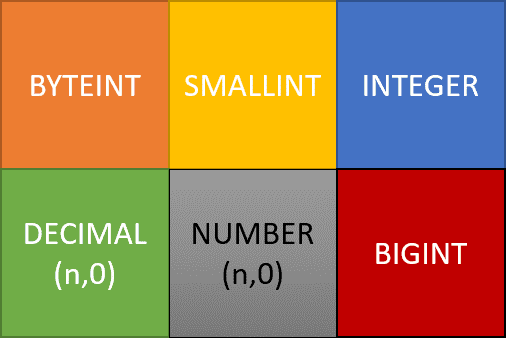
Integer Columns (INTEGER, BIGINT, etc.), including columns of type DECIMAL without decimal places (DECIMAL(10,0)).
What are the advantages compared to other methods of generating numbers?
Identity columns provide database-managed numeric identifiers, simplifying application code. Their allocation may be parallel and contain gaps; they do not guarantee perfectly even AMP distribution or replace required uniqueness constraints in every configuration.
Is it guaranteed that Teradata does not create duplicate numbers?
Uniqueness is only guaranteed if we define the identity columns with the GENERATED ALWAYS and NO CYCLE options. We will present these two options later in this article.
Are identity columns supported by the load utilities (Fastload, Multiload, etc.)?
Yes, identity columns support both transactional inserts and bulk loads.
Are the generated numbers in ascending order and without gaps?
Generated identity values can have gaps and are not guaranteed to reflect chronological insertion order. ROW_NUMBER numbers a query result; it is not a persistent, gapless multi-writer sequence.
What is the syntax for creating a table with an Identity Column?
Here is an example:
CREATE TABLE Customer
(
CustomerId BIGINT GENERATED ALWAYS AS IDENTITY
(START WITH 100 INCREMENT BY 1 MINVALUE 100 NO CYCLE),
LastName VARCHAR(255),
FirstName VARCHAR(255)
) PRIMARY INDEX (CustomerId);
What is one of the main applications for identity columns?
Creating Surrogate Keys.
What happens in the case of NO CYCLE when MAXVALUE is reached?
Teradata returns the following error: “*** Failure 7545 Numbering for Identity Column Customer. CustomerId is over its limit.”
Where can I see the value range of an identity column (current value, maximum value, minimum value, etc.)?
Use supported dictionary metadata for the actual release to inspect identity definitions and allocation. The historical DBC.IdCol layout is not an instruction to create or modify a system table. Cache allocation values are not necessarily the next value a particular session will receive.
What Are The Most Important Options Of The Teradata Identity Column?
- GENERATED ALWAYS: Always generates a value, whether or not the query passes a value.
- GENERATED BY DEFAULT: Generates a value only if the column value delivered in the SQL insert statement is NULL. We can use this property to copy existing data to a table with an identity column.
- START WITH: The first number used in the system-generated numeric sequence.
- INCREMENT BY: The step size by which each generated number gets incremented (one by default).
- MINVALUE: The minimum value to which a generated number can decrement. If MINVALUE is not specified, -2,147,483,647 is used (the minimum value for INTEGER).
- MAXVALUE: The maximum value by which a generated number can increment.
- CYCLE: Defines whether Teradata can reuse already generated values when it reaches the defined minimum or maximum values for an identity column.
The Teradata Identity Column and Performance
Loading data into a table that includes an Identity Column results in additional overhead. This is because each Virtual Processor (VPROC) is required to retrieve a range of numbers from DBC.IdCol and store them in its local cache.

Get the complete Teradata tuning book, free
Teradata Query Performance Tuning: The DWHPro Guide
By Roland Wenzlofsky & Artemios Vogiatzis
206 pages on statistics and demographics, access paths and indexes, query execution plans, and joins. Get the full PDF and practical Teradata updates from DWHPro.
Confirm your email to receive your download link. Privacy policy. Unsubscribe in any newsletter.
About the free bookNevertheless, the initial overhead is transitory since Teradata subsequently retrieves the numeric data from its cache.
Will a VPROC only receive a new range of numbers once it has exhausted its current supply? Generating several thousand identification column values can be accomplished in just a matter of seconds.
To enhance bulk insert performance, it is advisable to augment the DBSControl setting IdColBatchSize. This will lead to fewer accesses to the DBC.IdCol table in order to obtain a fresh range of numbers.
Improved performance is due to reduced updates on the DBC.IdCol table.
To account for potential data loss during loading or system restarts, optimal batch sizes must be determined based on the number of AMPs and larger batch sizes.
How are Teradata Identity Columns Generated?
Teradata identity column values generation relies on the row insertion method.
- INSERT…SELECT: The values are cached on the AMPs
- Single Row or USING clause: The values are cached on the Parsing Engine (PE)
Due to the independent and parallel functioning of VPROCs (AMPs or PEs), the generated numbers inserted into the table do not follow a chronological sequence.
Gaps may exist between the generated numbers, with larger gaps being more likely after system restarts, between loads, or when not all numbers are used.
Limitations Of Teradata Identity Columns
- Each table can only have one identity column.
*** Failure 3706 Syntax error: A table may not have multiple identity columns. - ALTER TABLE can’t add an identity column
*** ALTER TABLE Failed. 3706: Syntax error: Cannot add new Identity Column option - Can’t be part of a composite primary or secondary index
*** Failure 5784 Illegal usage of Identity Column CustomerId. - Identity generation can contain gaps and is not chronological or guaranteed to distribute perfectly. A PPI table with an identity column created and accepted an insert in the fixture, disproving the blanket PPI prohibition. ROW_NUMBER alone is not a persistent multi-writer sequence.
- Can’t be defined on secondary value ordered index bigger than 4 Bytes:
*** Failure 5466 Error in Secondary Index DDL, Order by column is non-numeric or is more than 4 bytes. - Can’t be defined in Global Temporary Tables or Volatile Tables:
*** CREATE TABLE Failed. [5784] Illegal usage of Identity Column CustomerId - Identity Columns with GENERATED ALWAYS can’t be updated.
*** UPDATE Failed. [5776] The GENERATED ALWAYS Identity Column CustomerId may not be updated. - Can’t be defined on non-partitioned NOPI tables:
*** Failure 3706 Syntax error: The identity Column in a NOPI table is unsupported.
The linked Teradata article examines how Identity columns can be utilized for generating surrogate keys.
https://docs.teradata.com/reader/scPHvjfglIlB8F70YliLAw/WdfF9oz3QtNau24q2XvXXA
Identity datatype/options, GENERATED ALWAYS/BY DEFAULT input handling and index restrictions must be checked for the actual definition and release. Do not modify DBC.IdCol directly; no system settings were changed in this audit.
Deciding what to change in your data platform?
Compare optimisation, modernisation and migration against your workload and business requirements.
Get the complete Teradata tuning book, free
Teradata Query Performance Tuning: The DWHPro Guide
By Roland Wenzlofsky & Artemios Vogiatzis
206 pages on statistics and demographics, access paths and indexes, query execution plans, and joins. Get the full PDF and practical Teradata updates from DWHPro.
Confirm your email to receive your download link. Privacy policy. Unsubscribe in any newsletter.
About the free book
Good Article. Informative. Thanks for posting.
It will be more helpful if a few examples are added along with the syntax of the same. Thanks!
It is useful to point out that tables with Generated Always Identity Columns can’t be used when copying a table with the created table as syntax. Also, any attempt to insert a value for the GA ID column will cause an error. Identity column tables can be problematic for some scenarios of data replication.
Absolutely agree with @MBrayshaw.
Identity columns add maintenance and replication pain. It is harder to restore the table, harder to make a Create Table As Select, harder to replicate table. Generated values are not dense, and do not enforce order inside a batch.
I think that Identity columns may be one of the weakest parts of Teradata and according to my experience, I’d recommend do not use them if possible.
It is usually better to generate a new ID for a surrogate key by the ETL process using its possibilities. As an alternative sometimes it is better to calculate a new ID for small tables by using ROW_NUMBER() analytical function.
Nevertheless, Teradata has no other opportunities to generate ID(except Identity columns and manual ROW_NUMBER() generation), so you have to use them if you are restricted by only Teradata’s facilities.
Best regards,
Aleksei.