
What is a Teradata Query Band?
Query bands tag requests for identification in DBQL. Configure appropriate DBQL logging and access with the administrator first; a tag alone does not enable logging. Capture query identity, time range and session. The examples below require a dedicated test session with no pre-existing query band, so SET QUERY_BAND=NONE restores its initial state. In an application session, preserve and restore the original band instead; clearing it would remove application/job tags.


How can I change an existing Teradata Query Band?
It is possible to update a query band or add key/value pairs to an existing one. However, removing a key/value pair from a current query band in Teradata is not feasible. In such cases, the whole query band should be redefined. To see the query bands of all active sessions, refer to the DBC.SessionInfoV view.
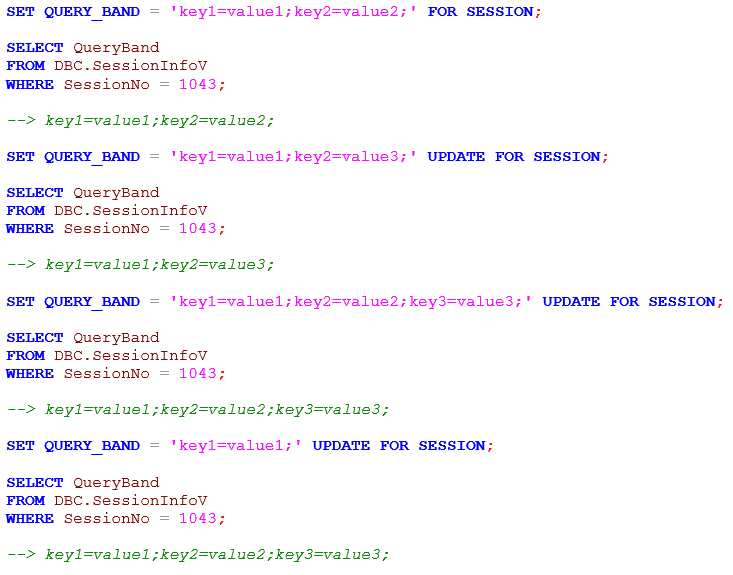
To quickly retrieve the key/value pairs from the “Queryband” column, use the GetQueryBandValue function. The function’s first parameter designates which query band to return if multiple bands exist (0 for the first, 1 for Transaction, and 2 for Session).

How Query Banding in Teradata can be used for Tuning
Assuming we have developed a more efficient SQL statement, it appears to take longer to execute when presented to a colleague. How can we confirm the validity of our optimization? Utilizing Teradata’s queryband feature, we can track the resource usage of each version of the query and compare the figures to gauge our progress accurately. This process involves wrapping the original and optimized queries in queryband tags to generate separate usage statistics. These statistics can then be efficiently read and documented for further analysis and presentation. The necessary steps to complete this process are as follows:
Get the complete Teradata tuning book, free
Teradata Query Performance Tuning: The DWHPro Guide
By Roland Wenzlofsky & Artemios Vogiatzis
206 pages on statistics and demographics, access paths and indexes, query execution plans, and joins. Get the full PDF and practical Teradata updates from DWHPro.
Confirm your email to receive your download link. Privacy policy. Unsubscribe in any newsletter.
About the free book- We must ensure that our Teradata SQL Assistant session makes no other requests once we have set the query band.
- We need to set the Teradata query band for the unoptimized version of our SQL, run the SQL, and turn it off immediately, as shown below:
SET QUERY_BAND = 'QUERY1=VS1;' FOR SESSION;
Select * FROM CustomerView;
SET QUERY_BAND=NONE FOR SESSION;- Next, we repeat the above two steps for our optimized query, using a different query band name, e.g. ‘QUERY1=VS2;’
- Finally, we can compare the result.
SELECT ProcID, QueryID, StartTime, SessionID, QueryBand, NumResultRows, NumSteps, TotalIOCount, AMPCPUTime, SpoolUsage
FROM DBC.DBQLogTbl
WHERE StartTime >= CURRENT_TIMESTAMP - INTERVAL '1' HOUR
AND SessionID = 12345
AND QueryBand LIKE '%QUERY1=%';
-- Replace 12345 and select the exact measured requests.
DBQL writes can be delayed. Wait for normal log transfer or ask the administrator for an appropriately scoped flush; do not casually flush all system query logs.
Compare semantic results as well as resource measurements under comparable conditions before concluding that a rewrite improved the workload.
What to consider when creating a Query Band in Teradata
In a production setting, retaining pertinent variables such as application and job names, script versions, and loading dates in the query band is logical. This facilitates their accessibility in DBC.DBQLOGTBL for future analysis of performance.
For effective query band design, it is essential to implement a consistent structure that can facilitate analysis across the Teradata system’s workload.
A Performance Tuning Example with the Teradata Query Band
Reporting often involves aggregating data from a single date or a range of dates.
Assuming that the tables have start and end dates, a common join scenario involves the product table being linked with a calendar table and limited to the reporting date. An example is provided below:
SELECT cal.calendar_date AS mydate, c.*
FROM Client c JOIN Sys_Calendar.Calendar cal
ON cal.calendar_date BETWEEN c.hist_start_date AND c.hist_end_date
WHERE mydate = DATE '2020-10-20';
1) First, we lock a distinct “pseudo table” for read on a RowHash to prevent global deadlock for c. 2) Next, we lock c for read. 3) We do a single-AMP RETRIEVE step from SYS_CALENDAR.CALDATES in view CALENDAR by way of the unique primary index “SYS_CALENDAR.CALDATES in view CALENDAR.cdate = DATE ‘2020-10-20′” with no residual conditions into Spool 2 (all_amps) (compressed columns allowed), which is duplicated on all AMPs. The size of Spool 2 is estimated with high confidence to be 390 rows (6,630 bytes). The estimated time for this step is 0.01 seconds. 4) We do an all-AMPs JOIN step from Spool 2 (Last Use) by way of an all-rows scan, which is joined to c by way of an all-rows scan with a condition of (“(c.hist_end_date >= DATE ‘2020-10-20’) AND (c.hist_start_date <= DATE ‘2020-10-20’)”). Spool 2 and c are joined using a product join, with a join condition of (“(cdate >= c.hist_start_date) AND (cdate <= c.hist_end_date)”). The result goes into Spool 1 (group_amps), which is built locally on the AMPs. The size of Spool 1 is estimated with no confidence to be 1,641,096 rows (1,296,465,840 bytes). The estimated time for this step is 0.78 seconds. 5) Finally, we send out an END TRANSACTION step to all AMPs involved in processing the request. > The contents of Spool 1 are sent back to the user as the result of statement 1. The total estimated time is 0.78 seconds.
Our example query consumes the following resources: CPUTime and Disk I/Os.
TotalIoCount: 71.588,00
AMPCPUTime: 175,29
Replacing the Calendar Table with a Query Band
A lesser-known approach utilizes query banding to avoid joining with a calendar table. The reporting date is saved in the session’s query band to eliminate the need for a join.
SET QUERY_BAND = 'mydate=2020-10-20;' FOR SESSION;
SELECT CAST(GetQueryBandValue(0,'mydate') AS DATE FORMAT 'YYYY-MM-DD') AS mydate, c.*
FROM Client c
WHERE CAST(GetQueryBandValue(0,'mydate') AS DATE FORMAT 'YYYY-MM-DD')
BETWEEN c.hist_start_date AND c.hist_end_date
AND mydate = DATE '2020-10-20';
SET QUERY_BAND = NONE FOR SESSION;
1) First, we lock a distinct “pseudo table” for read
on a RowHash to prevent global deadlock for c.
2) Next, we lock c for read.
3) We do an all-AMPs RETRIEVE step from c by way of an
all-rows scan with a condition of (“((SYSLIB.getquerybandvalue (0,
‘mydate’)(DATE, FORMAT ‘yyyy-mm-dd’))= DATE ‘2020-10-20’) AND
((c.hist_start_date <= (SYSLIB.getquerybandvalue (0,
‘mydate’)(DATE, FORMAT ‘YYYY-MM-DD’))) AND
(c.hist_end_date >= (SYSLIB.getquerybandvalue (0,
‘mydate’)(DATE, FORMAT ‘YYYY-MM-DD’))))”) into Spool 1
(group_amps), which is built locally on the AMPs. The size of
Spool 1 is estimated with no confidence to be 1,476,987 rows (
1,166,819,730 bytes). The estimated time for this step is 0.93
seconds.
4) Finally, we send out an END TRANSACTION step to all AMPs involved
in processing the request.
-> The contents of Spool 1 are sent back to the user as the result of
statement 1. The total estimated time is 0.93 seconds.TotalIoCount: 57.418,00
AMPCPUTime: 581,99
The historical figures correspond to about 20% less I/O and a 232% CPU increase (581.99 versus 175.29), not 330%. Those performance figures were not reproduced. The corrected-date fixture returned the same one row as the calendar query; the original 2015 band value returned none.
Product-join comparisons scale with the product of input row counts; with one input fixed, growth is linear in the other, not exponential. Multiple reporting dates require an explicitly equivalent rewrite and measured comparison.
Teradata Queryband Official Documentation
Deciding what to change in your data platform?
Compare optimisation, modernisation and migration against your workload and business requirements.
Get the complete Teradata tuning book, free
Teradata Query Performance Tuning: The DWHPro Guide
By Roland Wenzlofsky & Artemios Vogiatzis
206 pages on statistics and demographics, access paths and indexes, query execution plans, and joins. Get the full PDF and practical Teradata updates from DWHPro.
Confirm your email to receive your download link. Privacy policy. Unsubscribe in any newsletter.
About the free book
–Rather than using the LIKE in the predicate, you could use the built-in query band functions for a more flexible and extensible solution, here’s a slightly more involved example to illustrate:
–e.g.
— Intialise the QB for business date 2014-11-01
SET QUERY_BAND = ‘QUERY1=VS1;Bus_Date=2014-11-01;’ FOR SESSION ;
— Run the before SQL for business date 2014-11-01.
SELECT blah, blah…WHERE my_bus_date = DATE’2014-11-01′;
— Update the QB for another bus_date
SET QUERY_BAND = ‘QUERY1=VS1;Bus_Date=2014-11-02;’ UPDATE FOR SESSION ;
— Run the before SQL for business date 2014-11-02.
SELECT blah, blah…WHERE my_bus_date = DATE’2014-11-02′
— Update the QB for the tuned (after) queries
SET QUERY_BAND = ‘QUERY1=VS2;Bus_Date=2014-11-01;’ UPDATE FOR SESSION ;
— Run the before SQL for business date 2014-11-01.
SELECT blah, blah…WHERE my_bus_date = DATE’2014-11-01′;
— Update the QB for another bus-date
SET QUERY_BAND = ‘QUERY1=VS1;Bus_Date=2014-11-02;’ UPDATE FOR SESSION ;
— Run the after SQL for business date 2014-11-02.
SELECT blah, blah…WHERE my_bus_date = DATE’2014-11-02′
–Reset the QB
SET QUERY_BAND = NONE;
— Now go get the results – the point of the example:
SELECT GetQueryBandValue(t1.queryband,0,’QUERY1′)
,GetQueryBandValue(t1.queryband,0,’Bus_Date’)
,t1.*
FROM dbc.dbqlogtbl as t1
WHERE CAST(GetQueryBandValue(t1.queryband,0,’Bus_Date’) AS DATE)
BETWEEN date ‘2014-11-01’
AND date ‘2014-11-03’
AND t1.QueryBand IS NOT NULL;
Now you have many more options than what the LIKE clauses can enable.
Also check out:
SYSLIB.GetQueryBandSP
SYSLIB.GetQueryBandValueSP
SYSLIB.QueryBandReservedName
SYSLIB.GetQueryBand
SYSLIB.GetQueryBandPair
in addition to SYSLIB.GetQueryBandValue