
Get a Grip on Clumpy Row Distribution – the Teradata PPI Table.
For this technique to work properly, the primary index in Teradata should not include the partition column(s).
We have all encountered the issue of slow table inserts, where the distribution of rows across all AMPs is even, but the merge step takes excessive time.
One possible reason for the issue is the presence of a SET table with numerous identical NUPI values. The AMPs are required to perform a duplicate row check for every newly inserted row, resulting in significant time and CPU cycle consumption. This is due to each row being fully compared against all the other rows that share the same Primary Index value.
Switching to a MULTISET design for nonpartitioned tables can solve the problem, but we also have a great opportunity to address it with Teradata partitioned tables (PPI tables).
Given the table design below:
CREATE TABLE MultiLevel_Example
(  the_code INTEGER NOT NULL,
  the_date DATE  NOT NULL,
  the_value DECIMAL(18,0)
) UNIQUE PRIMARY INDEX (the_code)
PARTITION BY (
RANGE_N(the_date BETWEEN DATE '2015-01-01' AND DATE '2015-12-31' EACH INTERVAL '1' MONTH), RANGE_N(the_code BETWEEN 1 AND 5 EACH 1)
);
Notice how the partition columns are excluded from the Primary Index, which is essential for the trick to work.
Here is the internal table schematic:
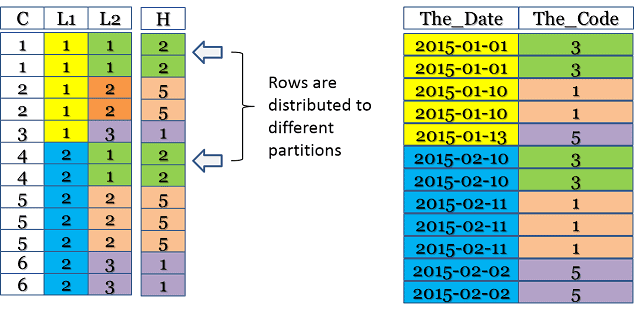
The column labeled “C” is the combined partition, “L1” is the first level of partitioning, and “L2” is the second tier. The column labeled “H” represents the ROWHASH of “The_Code.”
Creating a PPI table without all partitioning columns in the Primary Index results in the distribution of equal NUPI values across different partitions. This reduces clumping and enhances performance as the number of rows for each duplicate row check is significantly reduced.
However, it is important to note that placing partition columns outside of the Primary Index results in a penalty. It is necessary to assess the pros and cons before making a decision.
Every partition must be examined to locate the desired Primary Index value when utilizing primary index access. Moreover, merge joins may operate slower, and aggregations are more expensive as they span across partitions.
Let us briefly examine why this technique is ineffective for a Teradata PPI table if all partition columns are included in the Primary Index definition:
CREATE TABLE MultiLevel_Example
(
the_code INTEGER NOT NULL,
the_date DATE  NOT NULL,
  the_value DECIMAL(18,0)
) UNIQUE PRIMARY INDEX (the_code,the_date)
PARTITION BY (
RANGE_N(the_date BETWEEN DATE '2015-01-01' AND DATE '2015-12-31' EACH INTERVAL '1' MONTH), RANGE_N(the_code BETWEEN 1 AND 5 EACH 1)
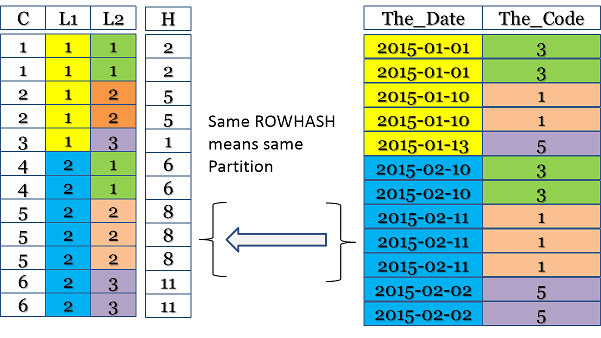
);Examine the illustration below. The ROWHASH is computed across all partition columns, making it impossible for the same ROWHASH to appear in multiple partitions due to its inherent design:
Click here for the Partitioned Primary Index Guide.
https://www.dwhpro.com/teradata-partitioned-primary-index/
Related Services
⚡ Need Help Optimizing Your Data Platform?
We cut data platform costs by 30–60% without hardware changes. 25+ years of hands-on tuning experience.
Explore Our Services →📋 Considering a Move From Teradata?
Get a personalized migration roadmap in 2 minutes. We have migrated billions of rows from Teradata to Snowflake, Databricks, and more.
Free Migration Assessment →
While performing a huge java transaction with insertion queries in batches.Getting AMP lock table has been overflowed SQL Exception .how to solve it? Do any settings need to be changed in DBS control ?