
Teradata Sessions explained in a few Sentences
What is a Teradata session?
A session is a u003cstrongu003eLOGON u003c/strongu003eof a user on a Teradata system through which one or more u003cstrongu003esequential transactions u003c/strongu003ecan be executed. A LOGOFF statement terminates the session.
What are multiple Teradata sessions (e.g., in BTEQ)?
For Teradata, multiple sessions are like several users (but with the same user credentials). Each session belongs to the same Teradata user and can execute one or more sequential transactions between LOGON and LOGOFF, just like a single session.
What are the multiple Teradata sessions used for?
Multiple sessions make it possible to run multiple tasks in parallel. The aim is to increase performance.
Does the use of Teradata multiple sessions always increase performance?
Not at all. For several sessions (e.g., in a BTEQ script) to increase performance, Rowhash accesses must be made. Rowhash access only occurs if a UPI, NUPI, or USI is used. All other access paths require a table lock, and using multiple sessions does not improve performance.
When does a BTEQ script typically increase performance by using multiple Teradata sessions?
A BTEQ import script can usually increase performance by using multiple sessions. BTEQ export scripts typically do not achieve any performance advantage by using multiple sessions.
How many Teradata sessions should I use?
This isn’t easy to answer and is best determined empirically. What is essential is an access path via the Rowhash (UPI, NUPI, USI). Too few sessions do not bring out the maximum performance. Too many sessions do not bring any more performance advantage after a certain point but increase the administration effort.
For which access paths do multiple sessions not make sense?
For Full Table Scans and NUSI accesses.
Example 1: Multiple Sessions which do not improve performance
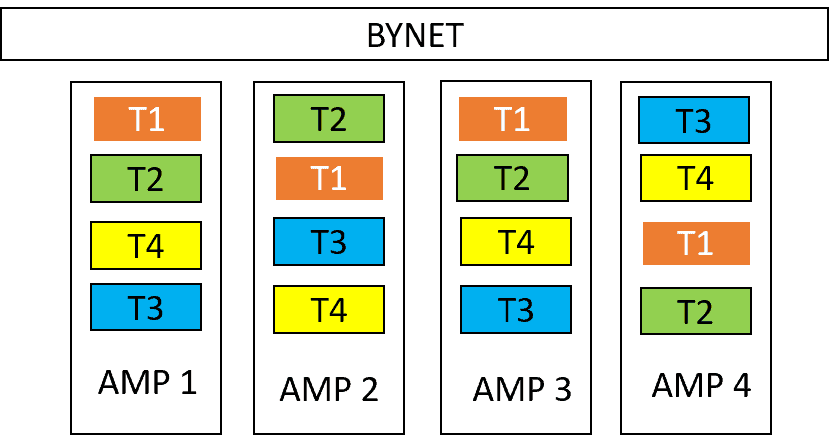
The graph shows that all four transactions (T1, T2, T3, T4) are concurrently active on all AMPs. Even for a single-row lookup, these transactions necessitate accessing all AMPs. None of the transactions use a single rowhash for access, resulting in no performance enhancement.
Example 2: Multiple Sessions which do improve performance
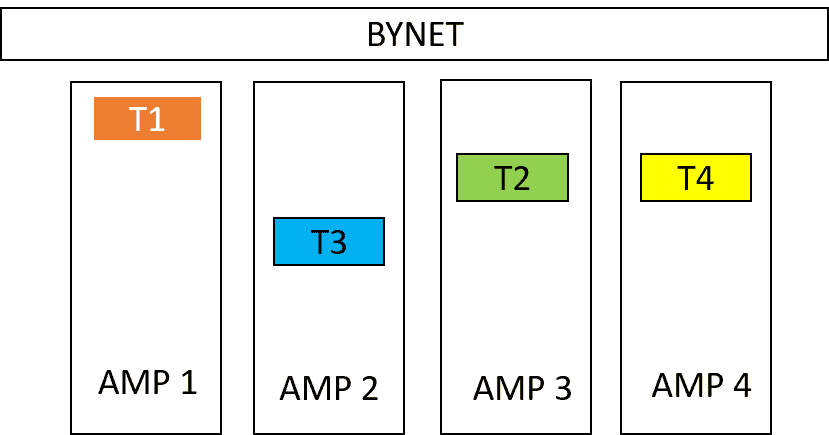
In Example 2, each transaction is exclusively active on one AMP, allowing all four AMPs to perform distinct tasks concurrently.
Multiple sessions are only beneficial if:
- Each transaction uses less than all AMPs
- Ideally, enough sessions are available to keep all AMPs equally busy with transactions.
Related Services
⚡ Need Help Optimizing Your Data Platform?
We cut data platform costs by 30–60% without hardware changes. 25+ years of hands-on tuning experience.
Explore Our Services →📋 Considering a Move From Teradata?
Get a personalized migration roadmap in 2 minutes. We have migrated billions of rows from Teradata to Snowflake, Databricks, and more.
Free Migration Assessment →
excellent topic
Nice article about sessions.. examples helps to clear the concept. Thanks for sharing
Thank you very much!
Thank you very much!