
What are Deadlocks in Teradata?
Deadlocks arise when two transactions hold locks on database objects required by the other transaction.
Here is an example of a deadlock:
Transaction 1 locks some rows in Table 1, and transaction 2 locks some rows in Table 2. The next step of transaction 1 is to lock rows in table 2, and transaction 2 needs to lock rows in table 1.
This is a classic deadlock scenario. If deadlock handling isn’t implemented, the transactions will remain in a perpetual wait state or until Teradata terminates them. Deadlocks on Teradata can occur within a single AMP (local deadlock) or involve multiple AMPs (global deadlock).
Fortunately, Teradata utilizes a queuing method to prevent deadlocks by serializing locking requests.
The naming convention for this locking strategy has changed in Teradata 15.10.
Before Teradata 14.10, “pseudo table locks” referred to the locking strategy, whether applied at the row hash level (for dictionary tables) or the table level.
Teradata 15.10 introduced a new feature known as “proxy locking” for table level and partition locking, while “pseudo table locking” refers to row hash locking on dictionary tables.
The strategy remains unchanged, except for partition locking, a new feature introduced in Teradata 15.10. The phrasing, however, has been updated.
The “Proxy” or “Pseudo Table” Lock Strategy
Insufficient locking methods may result in two transactions requesting a write lock on a table simultaneously. In such a scenario, the initial transaction may acquire the lock for the table on certain AMPs, while the second transaction obtains the locks on a different set of AMPs.
Neither transaction can complete its task. Both requests will remain indefinitely pending. However, a NOWAIT lock modifier option can be used to terminate the request if the AMP cannot acquire the lock immediately.
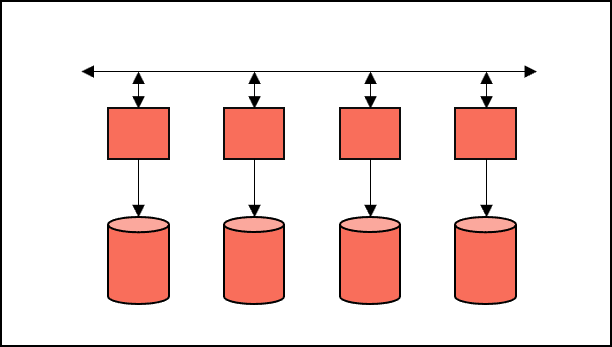
A common deadlock scenario involving multiple AMPs:
Serializing requests with the “proxy lock” or “pseudo table” strategy prevents deadlocks.
Many of you may be familiar with the phrase “to prevent global deadlock” when analyzing a query. The EXPLAIN plan below is from a Teradata 15.10 system.
Explain UPDATE CUSTOMER SET AGE = 40;1) First, we lock DWHPRO.CUSTOMER for write on a reserved RowHash to prevent global deadlock.2) Next, we lock DWHPRO.CUSTOMER for write.3) We do an all-AMPs UPDATE from DWHPRO.CUSTOMER by way of an all-rows scan with no residual conditions. The size is estimated with high confidence to be 100,000 rows. The estimated time for this step is 0.21 seconds.4) Finally, we send out an END TRANSACTION step to all AMPs involved in processing the request.-> No rows are returned to the user as the result of statement 1. The total estimated time is 0.21 seconds.Teradata Deadlock Prevention in Action
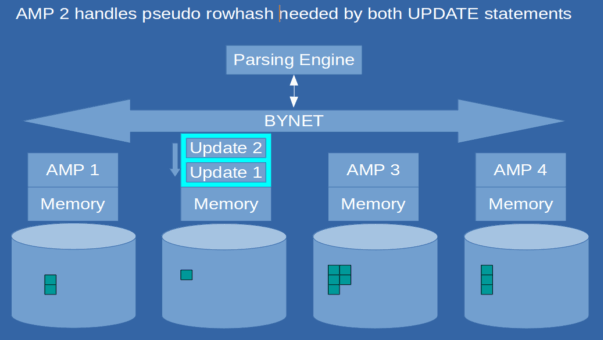
Here’s an example demonstrating the implementation of a deadlock handling strategy.
Two update statements (‘Update 1’ and ‘Update 2’) are executing simultaneously and attempting to modify the same table. Both updates require a write lock.
UPDATE Customer SET Age = 40 ;UPDATE Customer SET Gender = 'M';To ensure each request obtains the required lock, “Pseudo table” or “Proxy” locking issues a pseudo lock on a reserved rowhash before acquiring the necessary lock.
“Proxy” or “pseudo table” locking designates an AMP as the gatekeeper of locks for every table. To locate the gatekeeper AMP for a given table, its “table id” value is hashed.
Hashing the “table id” locates the gatekeeper AMP, operating similarly to primary index hashing.
The ROWHASH for a given “table id” remains constant due to the stability of the hashing algorithm. Assuming a consistent system configuration, each table is assigned to a specific AMP without exception.
In our example, two update statements require a write lock on the identical table.
Assuming that “update 1” is slightly faster than “update 2”, it will get the “proxy” or “pseudo table” lock on AMP 2, which is the gatekeeper for the table “Customer.” “Update 2” has to wait in the “gatekeeper” queue of AMP 2 and will be next as soon as “Update 1” is finished and has released the write lock.
Teradata Deadlocks and BTEQ
BTEQ can retry a step that ends in a deadlock if the error code 2631 is triggered and “.SET RETRY ON” is enabled. Other client applications do not have this feature, so we need to implement it through programming.
Recommendations for reducing Deadlocks in Teradata
- Use LOCKING FOR ACCESS whenever dirty reads are allowed.
LOCKING Customer FOR ACCESS SELECT * FROM Customer;
- Avoid BT/ET but use multistatement requests instead to avoid table-level deadlocks.
- For unique index access (UPI, USI), use LOCKING ROW FOR WRITE or EXCLUSIVE before executing a transaction.
- In an application, we suggest putting all exclusive locks on tables and databases needed at the beginning of the transaction.
- If a lock can’t be granted, use the NOWAIT locking modifier option to abort the transaction immediately.
Limitations
The strategy described above does not eliminate all deadlocks. It is effective only when both transactions use table locks. If one or both requests use row hash locking, deadlocks may still occur.
Deadlock detection is time-consuming as Teradata automatically checks for global deadlocks every four minutes and local deadlocks every 30 seconds.
Typically, these time frames are satisfactory. However, reducing the intervals for detecting global deadlocks in certain situations may be necessary.
My client relies heavily on join indexes to facilitate primary index access through row hash locks for tactical workload requests. However, this has resulted in numerous global deadlocks. Despite this, using join indexes enables stable and efficient execution times.
Setting global deadlock detection to four minutes is counterproductive in this case.
What Kinds of Deadlocks Exist?
AMP-local deadlocks are detected every 30 seconds by the deadlock detection software on the same AMP.
Deadlocks can occur globally among various AMPs, and the deadlock detection software automatically checks for them every 4 minutes by default. The DBS control utility (specifically the Parameter DeadLockTimeOut) can be used to adjust the interval.
Which transaction is aborted in case of a Deadlock?
The latest transaction will be canceled and reversed.
How can I handle Deadlocks in BTEQ?
Enabling the RETRY feature ensures that only the failed request is repeated in case of a deadlock in BTEQ rather than the entire transaction.
Here is an example:
SELECT * FROM Customer;
SELECT * FROM Deals;
Using a semicolon at the end of each line creates two independent requests. If request two is unsuccessful, request one will not be rolled back by Teradata.
The two queries can be combined by rewriting the BTEQ as a multi-statement query:
SELECT * FROM Customer
;SELECT * FROM Deals;
Enabling the RETRY feature in BTEQ can lead to unexpected consequences.
.SET RETRY
BEGIN TRANSACTION;
INSERT INTO Customer VALUES (1);
INSERT INTO Customer VALUES (2);
INSERT INTO Customer VALUES (3);
END TRANSACTION;
If the final INSERT statement is unsuccessful, Teradata will undo the whole transaction, but BTEQ will make another attempt to execute only the preceding INSERT statement. If it is successful, it will have been performed as an implicit transaction, making the END TRANSACTION redundant since the third INSERT statement has already been committed.
How can I handle Deadlocks in my Applications?
Although BTEQ does offer RETRY functionality, in the case of a deadlock in your applications, you must resubmit the entire aborted transaction. Your application should be able to detect error code 2631 and initiate the resubmission of the transaction.
Is Teradata always respecting the LOCKING Modifier?
Teradata can upgrade locks as needed.
Where can I see the system-wide deadlocks?
The DBC.ResUsageSPMA view includes the DBLockDeadlocks column, facilitating deadlock analysis during the specified sample interval (e.g., 600 seconds).
We can influence locks and often prevent deadlocks by utilizing locking for access. This article will teach you the various types of locks and how to utilize them optimally.
More granular types of deadlocks
Deadlocks can occur not only at the transaction level but also at the file system level, specifically in disk segments.
The DBC.ResUsageSPMA view offers columns that aid in analyzing disk segment deadlocks at the system level. These columns display the aggregate count of blocks, deadlocks, and lock requests for each disk segment.
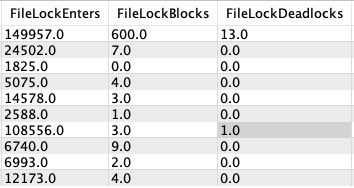
| FileLockBlocks | The number of lock requests that were blocked. |
| FileLockDeadlocks | The number of deadlocks detected on lock requests. |
| FileLockEnters | The number of times a lock was requested. |
Related Services
🔧 Need Expert Database Administration?
Our team brings 25+ years of enterprise DBA experience across Teradata, Snowflake, and Oracle.
Meet Our Team →📋 Considering a Move From Teradata?
Get a personalized migration roadmap in 2 minutes. We have migrated billions of rows from Teradata to Snowflake, Databricks, and more.
Free Migration Assessment →
Hello.
Thank you for the helpful article.
I’m not sure that the difference between proxy lock(15.10) and pseudo table lock is just wording change.
As I understand, a pseudo table lock is only once per instance. That fact may possible leads to collisions if the hash(TableId) is lead to the same AMP for two different TableID, and in turn, it decreases concurrency to some degree.
But a proxy lock is more granular. It is one per table or maybe is one per table partition(in the case when a table is row partitioning).
If i understand documentation correctly, each table or row partition of table contains a “something”(most probably a row) with reserved hash code 0xFFFFFFFF or 0xFFFFFFFFFFFFFFFF( those hash codes can not be generated for hashing functions). And it(“something”) is used as a global serialization queue per table or per partition in the same way as pseudo table locks are used before 15.10(except the fact that it is more granular than pseudo table locks).
So the main idea of Proxy Locks looks to be an increasing concurrency by making locks more granular.
Best regards,
Aleksei.
Hi Roland,
A good simple post to explain this bit of processing. A couple of points that I’d like to make:
1) The wording for this processing changed in TD 15.10. before that you would see something like the following:
First, we lock a distinct workdb.”pseudo table” for read on a
RowHash to prevent global deadlock for DWHPRO.CUSTOMER.
My point is that the processing hasn’t changed, it is ** only ** the words in the Explain output that have changed.
2) Even with this processing in place, it doesn’t prevent all deadlocks in a Teradata system. Row hash locks do not use the “pseudo table” mechanism, so you can get deadlocks between two transactions if at least one of them uses a row-hash lock.
3) Finally, the time it takes for Teradata to resolve global deadlocks is tunable (via DBSControl). The default is 240 seconds (4 minutes) which in my experience most customers use and that seems to be fine. Unlike on earlier types of Nodes, the current Node types (more specifically the CPU’s that they’re using) mean that you can set this quite low.
Cheers,
Dave
Thanks, Dave!
I enriched the article with your comments!
excellent but got confused with pseudo locks..so please explain me in detail
I was improving the post a little bit. Please let me know if you still have questions, and thanks to everybody for the feedback!
This is a good explanation on a very much needed topic
Roland, what about “proxy lock”, which appeared in Teradata 15.10. What are the differences between that mechanism and “pseudo lock”?
Hi, I included the answers to your question in the post