
Hello, data enthusiasts! Today, we’re delving into a Teradata SQL scenario focusing on enhancing performance by avoiding full table scans and effectively using secondary indexes. This technical tutorial aims to demonstrate how to bypass the COALESCE function in the WHERE clause, which often leads to full table scans, and instead adopt an alternative approach that leverages secondary indexes.
Setting Up The Scenario for Optimizing Teradata SQL
First, let’s start by creating a simple multi-set table DWHPRO.INDEX_USAGE. This table includes three columns: PK (Primary Key), TheStartDate, and TheEndDate. We’re using a Primary Index on the PK Column. Here is the syntax to create this table:
CREATE MULTISET TABLE DWHPRO.INDEX_USAGE(PK BIGINT NOT NULL,TheStartDate DATE FORMAT ‘YYYY-MM-DD’,TheEndDate DATE FORMAT ‘YYYY-MM-DD’) PRIMARY INDEX (PK);Next, we populate the INDEX_USAGE table with some data. We use the ROW_NUMBER() function to generate unique keys for the PK column and use the SYS_CALENDAR.CALENDAR to fill in TheStartDate and TheEndDate:
INSERT INTO DWHPRO.INDEX_USAGESELECTROW_NUMBER() OVER (ORDER BY 1) AS PK,CALENDAR_DATE,CALENDAR_DATE + 100FROM SYS_CALENDAR.CALENDARCreating Secondary Indexes in Teradata
We’re also creating two unique secondary indexes / USI on TheStartDate and TheEndDate:
CREATE UNIQUE INDEX (TheEndDate) ON DWHPRO.INDEX_USAGE;CREATE UNIQUE INDEX (TheStartDate) ON DWHPRO.INDEX_USAGE;To optimize the use of indexes, statistics must be gathered. Although unnecessary for USI, they are imperative for NUSI. It is recommended to collect statistics for columns frequently used in WHERE conditions.
COLLECT STATS COLUMN (TheStartDate) ON DWHPRO.INDEX_USAGE;COLLECT STATS COLUMN (TheEndDate) ON DWHPRO.INDEX_USAGE;The Problem with Teradata COALESCE in WHERE Clause
Now, let’s run an EXPLAIN on a SELECT query that uses the COALESCE function in the WHERE clause:
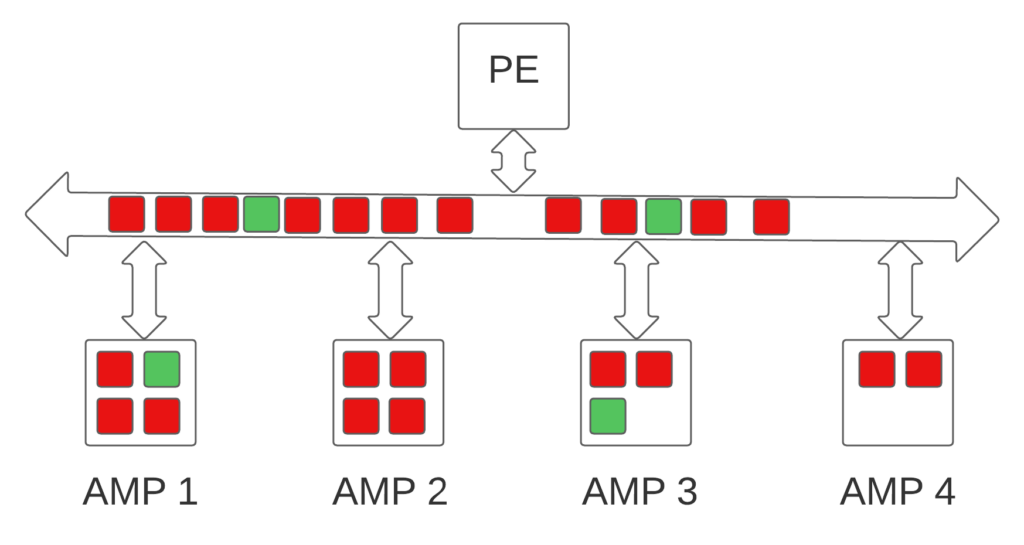
EXPLAINSELECT * FROM DWHPRO.INDEX_USAGE WHERE COALESCE(TheStartDate,TheEndDate) = DATE’2022-10-10′3) We do an all-AMPs RETRIEVE step in TD_MAP1 from DWHPRO.INDEX_USAGEby way of an all-rows scan with a condition of (“(( CASE WHEN (NOT(DWHPRO.INDEX_USAGE.TheStartDate IS NULL )) THEN(DWHPRO.INDEX_USAGE.TheStartDate) ELSE(DWHPRO.INDEX_USAGE.TheEndDate) END ))= DATE ‘2022-10-10′”) intoSpool 1 (group_amps), which is built locally on the AMPs. Thesize of Spool 1 is estimated with no confidence to be 14,684 rows(543,308 bytes). The estimated time for this step is 0.15 seconds.4) Finally, we send out an END TRANSACTION step to all AMPs involvedin processing the request.The optimizer conducts a full table scan as the secondary index cannot be employed due to the Teradata COALESCE function, which eliminates the possibility of utilizing the hashing algorithm to locate rows, thus mandating a full table scan.
Optimizing Teradata SQL – Leveraging Teradata Secondary Indexes
So, how do we maintain the same logic but avoid the full table scan? Here’s a modified version of the above query:
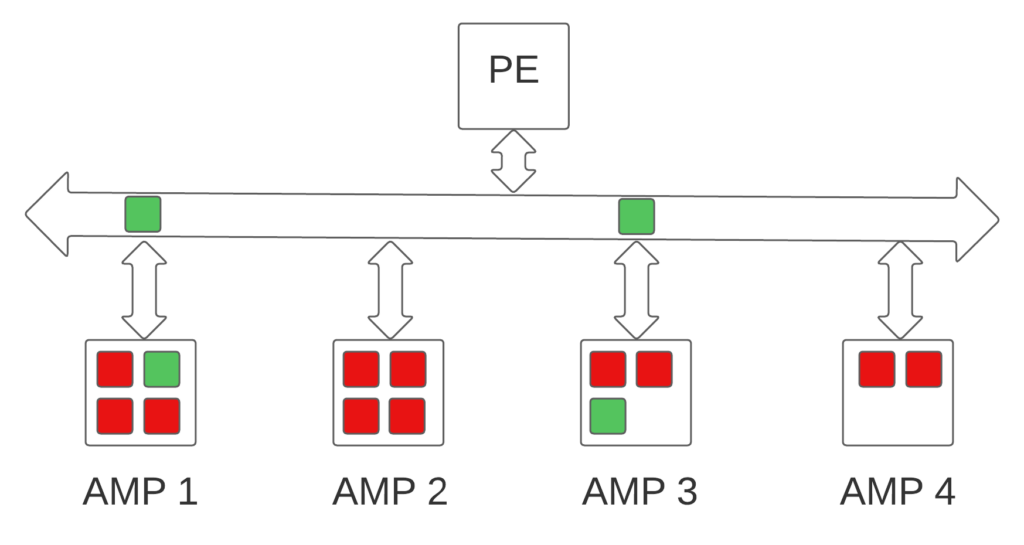
EXPLAINSELECT * FROM DWHPRO.INDEX_USAGE WHERE TheStartDate = DATE’2022-10-10′ OR (TheStartDate IS NULL AND TheEndDate = DATE’2022-10-10′)In this version, the optimizer can leverage the secondary indexes on TheStartDate and TheEndDate. Why? Because we’re directly referring to the columns individually in the WHERE condition, allowing the Optimizer to use the ROWHASH to access the selected rows:
3) We do a two-AMP RETRIEVE step in TD_MAP1 from DWHPRO.INDEX_USAGEby way of unique index # 4 “DWHPRO.INDEX_USAGE.TheStartDate = DATE’2022-10-10′” extracting row ids only with no residual conditionsinto Spool 2 (all_amps), built locally on the AMPs. Thesize of Spool 2 is estimated with high confidence to be 1 row.The estimated time for this step is 0.00 seconds.4) We do a two-AMP RETRIEVE step in TD_MAP1 from DWHPRO.INDEX_USAGEby way of unique index # 8 “DWHPRO.INDEX_USAGE.TheEndDate = DATE’2022-10-10′” extracting row ids only with no residual conditionsinto Spool 2 (all_amps), built locally on the AMPs. Thesize of Spool 2 is estimated with high confidence to be 2 rows.The estimated time for this step is 0.00 seconds.5) We do an all-AMPs SORT to order Spool 2 (all_amps) by row ideliminating duplicate rows. The estimated time for this step is0.00 seconds.6) We do an all-AMPs RETRIEVE step in TD_MAP1 from DWHPRO.INDEX_USAGEby way of row ids from Spool 2 (Last Use) with a residualcondition of (“((DWHPRO.INDEX_USAGE.TheStartDate IS NULL) AND(DWHPRO.INDEX_USAGE.TheEndDate = DATE ‘2022-10-10’)) OR(DWHPRO.INDEX_USAGE.TheStartDate = DATE ‘2022-10-10’)”) into Spool1 (group_amps), which is built locally on the AMPs. The size ofSpool 1 is estimated with low confidence to be 2 rows (74 bytes).The estimated time for this step is 0.01 seconds.7) Finally, we send out an END TRANSACTION step to all AMPs involvedin processing the request.In conclusion, removing the Teradata COALESCE function and directly referring to the columns in the WHERE clause allows the optimizer to use the secondary indexes. This drastically reduces the need for a full table scan, significantly improving your query performance.
Moreover, this approach enhances the accuracy of the optimizer’s confidence levels and estimations. The optimizer, equipped with clear instructions, can now make more informed decisions about the data distribution and choose the most efficient execution plan. This precision is particularly beneficial if this query forms part of a larger SQL statement, where improved estimations can drastically enhance the execution plan.
In essence, better optimizer estimations lead to more efficient use of resources, faster query execution, and, thus, a more performant database system. The knock-on effect is particularly pronounced in complex, multi-layered SQL statements where small efficiencies can compound to create substantial performance gains.
Therefore, understanding and correctly utilizing your SQL syntax improves the performance of your individual queries and can lead to holistic improvements in your larger SQL operations.
It’s important to note that while the COALESCE function is a powerful tool, its usage in the WHERE clause, especially on indexed columns, can lead to less efficient full table scans. Hence, understanding and appropriately designing your SQL statements for index usage can often lead to significant performance improvements.
Testing the Difference
To fully understand the difference in performance between the two queries, you could execute them in your Teradata environment and compare the time it takes for each query to complete. This will help you quantify the improvement you can achieve by using secondary indexes effectively and avoiding using the COALESCE function in the WHERE clause.
Remember, though, that performance can vary based on several factors, including the size of your table, the distribution of your data, the system load at the time of execution, and more.
Conclusion
This scenario perfectly illustrates how minor tweaks in your SQL query can result in substantial performance gains. SQL optimization is an art requiring an understanding of both your data and the specific nuances of your database system.
In our case, by avoiding the use of the COALESCE function in the WHERE clause and directly referring to the indexed columns, we made it possible for the optimizer to take advantage of the secondary indexes, thereby bypassing a full table scan.
Remember, every improvement, no matter how small it might seem, contributes to a more efficient and effective workload. Keep optimizing, keep experimenting, and keep learning!
Practical applications of the COALESCE function exist. Recognizing when this function is not ideal for maximum performance is just as crucial:
https://www.reddit.com/r/SQL/comments/vebcvs/what_is_the_use_case_of_coalesce_not_what_it_does/Related Services
⚡ Need Help Optimizing Your Data Platform?
We cut data platform costs by 30–60% without hardware changes. 25+ years of hands-on tuning experience.
Explore Our Services →📋 Considering a Move From Teradata?
Get a personalized migration roadmap in 2 minutes. We have migrated billions of rows from Teradata to Snowflake, Databricks, and more.
Free Migration Assessment →