
Types of Teradata Access Rights
Teradata categorizes access privileges into four types:
- Implicit: The Teradata privileges of a user or database owning an object (“ownership privilege”)
- Explicit: The privileges explicitly granted with the GRANT statement
- Inherited: The privileges inherited by being a role member
- Automatic: The privileges automatically granted by Teradata
Owners and Creators
Teradata distinguishes between creators and owners of database entities.
The creator of an object is the user who executes the DDL statement for its creation. As a result, only a single user can have this role.
The database object’s owners comprise all users and databases positioned higher in the database hierarchy.
The database of a new object is referred to as its immediate owner.
If DBA creates an “Object,” they are the creator, while “System Admin” and “Database 1” are the owners.
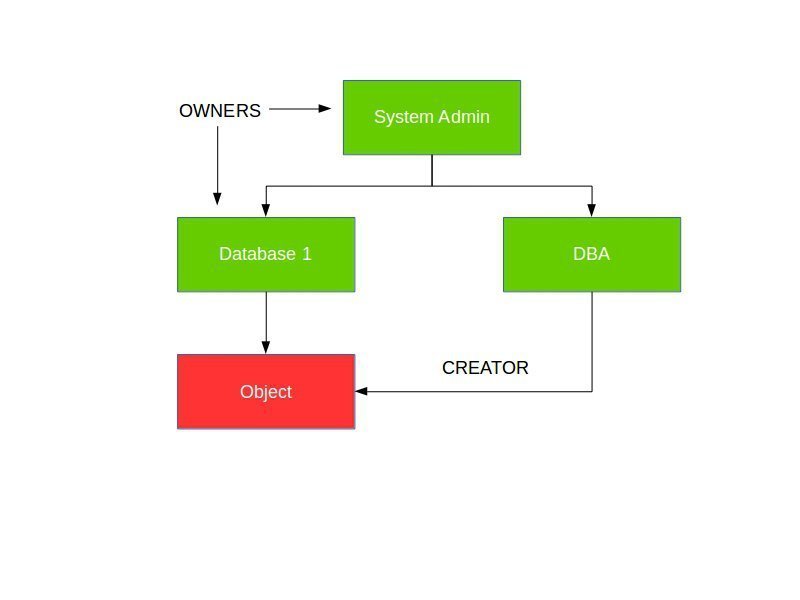
Teradata Access Rights – Implicit Privileges
Object owners are granted implicit privileges and do not require a corresponding row in the DBC.Accessrights table, although Teradata does create such rows by default, which can be deleted. Ownership privileges cannot be revoked.
An object’s owner can grant explicit privileges to other users, databases, and roles (WITH and WITHOUT GRANT options).
The “System Admin” and “Database 1” databases possess implicit privileges on the “Object”.
Teradata Access Rights – Explicit Privileges
Explicit privileges are managed through the use of GRANT and REVOKE statements.
The GRANT statement assigns explicit privileges to databases, users, tables, indexes, views, stored procedures, UDFs, macros, and roles:
GRANT <privileges> ON <object> TO <user> [WITH GRANT OPTION];
To grant explicit privileges, the granting user needs to have the same privileges on this object and grant authority (“WITH GRANT OPTION”)
Explicit grants may be revoked upon fulfillment of the following requirements:
- We have the permission to grant the permissions, or
- We are the owner of the object.
Automatic Privileges
Certain privileges are automatically granted when a user creates an object, such as users, databases, tables, views, etc. Automatic privileges are automatically granted by Teradata (“Creator Privilege”). If a table is created, the assigned privileges are DELETE, INSERT, UPDATE, SELECT, etc.
Suppose a user creates a new database or user. In that case, they will receive automatic permissions on the object, and the new object will be granted certain privileges, including delete, insert, update, and select.
Inherited Privileges
Privileges inherited through roles simplify administration by allowing for the assignment of multiple rights to a user through a single role. This eliminates the need to assign individual rights repeatedly to each user. They are therefore available indirectly through an assigned role rather than being granted to a user directly. This approach is preferred for granting permissions.
Related Services
🔧 Need Expert Database Administration?
Our team brings 25+ years of enterprise DBA experience across Teradata, Snowflake, and Oracle.
Meet Our Team →📋 Considering a Move From Teradata?
Get a personalized migration roadmap in 2 minutes. We have migrated billions of rows from Teradata to Snowflake, Databricks, and more.
Free Migration Assessment →
Thank you very much, Johannes!
What I found useful was the macro for access rights from mister Wellman:
https://teradataforum.com/teradata/20150803_082351.htm
This gives a pretty good overview of what database/user has rights on what and why.
Thanks, Dave! I will improve the article.
Hi Roland,
Good basic information clearly presented. Well done.
However, I think that your description of ‘inherited’ Access Rights is missing something. I understand why you’ve described Access Rights from Roles as being inherited (I’d never thought of them that way but I see your point), but the term ‘inherited Access Right’ is often used to describe something else.
An ‘inherited’ Access Right is one that is granted to a user/database specifically during the “CREATE USER/DATABASE” command. Assume the following hierarchy and commands.
A user name DEV_USERS exists.
The following command is executed: “GRANT SELECT ON db1 TO ALL DEV_USERS;”
The following command is now executed: “CREATE USER Fred FROM DEV_USERS;”
As a result of this (specifically the ‘ALL DEV_USERS’), when ‘fred’ is created, this userid will also be granted the SELECT Access Right on database ‘db1’. this user has inherited the Access Right from an owner.
Cheers,
Dave